

USB-C Fast Charging Hub Canada: The 2026 Professional Guide
2026 Aug 2nd

By 2026, a workspace hub that cannot handle a laptop and a smartphone at full speed isn't just inconvenient; it's obsolete. Most Canadian professionals struggle with cheap hubs that overheat or drop charging rates the moment they plug in a second peripheral. You've likely dealt with the clutter of multiple power bricks or cables that are too short to reach the centre of your desk. It's a common frustration that slows down productivity in an increasingly fast-paced digital environment.
This guide helps you find the ideal usb c fast charging hub canada to reclaim your desk space without sacrificing performance. You'll learn how to identify genuine PD 3.1 ratings and why GaN technology is now the standard for cool, efficient power delivery. We'll explore the technical specifications of the Devia Leopard Series and show you how to build a reliable, single-cable setup that keeps your devices powered all day.
Key Takeaways
- Organize your professional workspace by centralizing data transfer and rapid power through a single, durable Type-C connection.
- Learn why Power Delivery (PD) 3.1 and GaN technology are essential for maintaining fast charging speeds without overheating your hardware.
- Identify the specific wattage requirements for your devices to ensure your usb c fast charging hub canada provides sufficient power distribution.
- Discover the ergonomic benefits of the Devia Canada Leopard Series 11-in-1 hub, which doubles as a laptop stand to improve airflow and device longevity.
- Compare portable hubs versus full docking stations to select the hardware that matches your specific port and display requirements.
Why Your Workspace Needs a USB-C Fast Charging Hub in 2026
Canadian remote work has evolved beyond the kitchen table. By 2026, the professional home office is a high-performance environment where efficiency is the only metric that matters. Centralizing your power and data through a single port is no longer a luxury; it's a requirement for staying productive. Relying on a high-quality usb c fast charging hub canada allows you to eliminate the traditional "cable nest" that plagues most desks. It creates a streamlined workflow where one connection handles everything.
Future-proofing is a major factor this year. With the iPhone 17 and the latest laptop generations fully adopting the USB-C standard, your hardware ecosystem is finally unified. One hub can now charge your phone, power your laptop, and connect your peripherals simultaneously. Sourcing these hubs from a Canadian-focused retailer ensures you receive hardware designed for local power standards with reliable national shipping speeds. It avoids the long wait times and potential customs issues associated with international orders.
The Problem with Standard USB Hubs
Generic hubs often fail under pressure. Most basic models lack the sophisticated power management needed to charge a laptop while running external drives or monitors. You've likely seen the "slow charging" warning or experienced a sudden device disconnect when plugging in a second peripheral. These failures happen because cheap hubs can't negotiate Power Delivery (PD) effectively. They prioritize data over power, leaving your battery draining even while plugged in. This inconsistency disrupts your workflow and can even lead to long-term battery degradation on expensive devices like a MacBook or Samsung Galaxy.
Benefits of a Multi-Port Smart Hub
A professional smart hub acts as the command centre for your productivity. It handles simultaneous data transfer and high-speed charging without dropping the connection. Organizing your workspace around a central hub creates a clean, distraction-free environment. Aesthetics matter in professional settings too. A metal grey finish provides a modern, durable look that matches premium laptop finishes. Beyond looks, metal housings help with thermal regulation, ensuring the hub stays cool during heavy use. This reliability is why professionals are moving toward integrated solutions like the Leopard Series, which combine connectivity with smart power distribution to keep every device at peak performance.
Understanding Fast Charging: PD, GaN, and Power Distribution
Power Delivery (PD) is the communication protocol that allows your hardware to negotiate the exact amount of electricity needed. It's the critical technology behind any reliable usb c fast charging hub canada. Without PD, a hub wouldn't know whether it's powering a low-draw smartphone or a power-hungry workstation. Power Delivery 3.0 is a standardized fast-charging protocol that supports a maximum wattage of 100W for compatible devices. This standard ensures that your devices receive the fastest charge possible while maintaining strict safety limits.
Modern hubs rely on GaN fast charging technology to maintain a compact footprint. Gallium Nitride is a semiconductor material that conducts electrons more efficiently than traditional silicon. This efficiency means less energy is lost as heat, allowing for high-wattage output in a chassis that fits in your palm. Intelligent power distribution works alongside this hardware to split current safely. If you plug in a Samsung Galaxy alongside your laptop, the hub reallocates power in real time to ensure both devices charge at their maximum possible speeds without overloading the circuit.
Wattage Ratings Explained
Choosing between a 60W and 100W hub depends entirely on your primary device. A 60W rating is usually sufficient for tablets and light ultrabooks. However, professional laptops like the MacBook Pro or high-end Windows workstations require a 100W hub to stay powered during heavy video editing or compiling. Most hubs use a "pass-through" system, meaning the hub itself consumes about 10W to 15W to run its internal ports. If you have a 60W charger plugged into a hub, your laptop might only receive 45W. Ensuring your multi-device charging station apple setup is optimized requires calculating this overhead to avoid slow-charging warnings.
Thermal Management and Safety
Safety is a priority for Canadian electronics, especially with Health Canada's focus on lithium-ion battery hazards under the Canada Consumer Product Safety Act. High-wattage charging generates heat, and how a hub manages that heat determines its longevity. Metal housings, specifically aluminum, are the professional standard for heat dissipation. They pull warmth away from the internal chips and release it into the air. Certified hardware includes built-in safeguards like over-voltage, over-current, and short-circuit protection. These features prevent a power surge from damaging your expensive connected devices. For a reliable setup, you can explore professional-grade hubs that prioritize these technical safety standards.
Comparing USB-C Hubs vs. Full Docking Stations
Choosing the right hardware depends on your mobility requirements. A usb c fast charging hub canada provides the flexibility needed for a hybrid work schedule. While hubs prioritize size and portability, full docking stations focus on massive expansion and permanent connectivity. Understanding the distinction between these two categories ensures you don't overspend on features you won't use or end up with a device that can't handle your workload.
The Devia Leopard Series bridges this gap by offering a hybrid solution. It functions as a high-performance 11-in-1 docking station while maintaining a foldable, portable profile. This model includes an integrated stand, which is a rare feature in standard hubs. It allows for better ergonomics and airflow without the bulk of a traditional desktop dock. It's an ideal middle ground for professionals who need high port density but still travel between a home office and a corporate centre.
When to Choose a Portable Hub
Commuters and students often need a lightweight solution that doesn't add significant weight to a laptop bag. Portable hubs usually weigh less than 150 grams and fit easily into a side pocket. These devices are perfect for hot-desking environments across Canada where you only need to connect a few essential peripherals. You should prioritize models that offer a mix of USB-A for legacy drives, HDMI for presentations, and a USB-C port for pass-through charging. If your day involves moving between meeting rooms, a compact hub is the most efficient choice for your workflow.
When a Docking Station is Essential
Power users driving dual 4K monitors at 60Hz need the increased bandwidth that only a full docking station can provide. These units often include a dedicated power supply, which ensures that every connected device receives consistent voltage. A docking station creates a reliable home base for your entire mobile ecosystem. It's the best place to organize your apple watch bands, phone chargers, and external backup drives in one central location. If you rarely move your laptop from your desk, the stability and port variety of a dock outweigh the benefits of a smaller hub. High-speed Ethernet ports are also more common on these larger units, providing a lag-free connection for video conferencing and large file transfers.
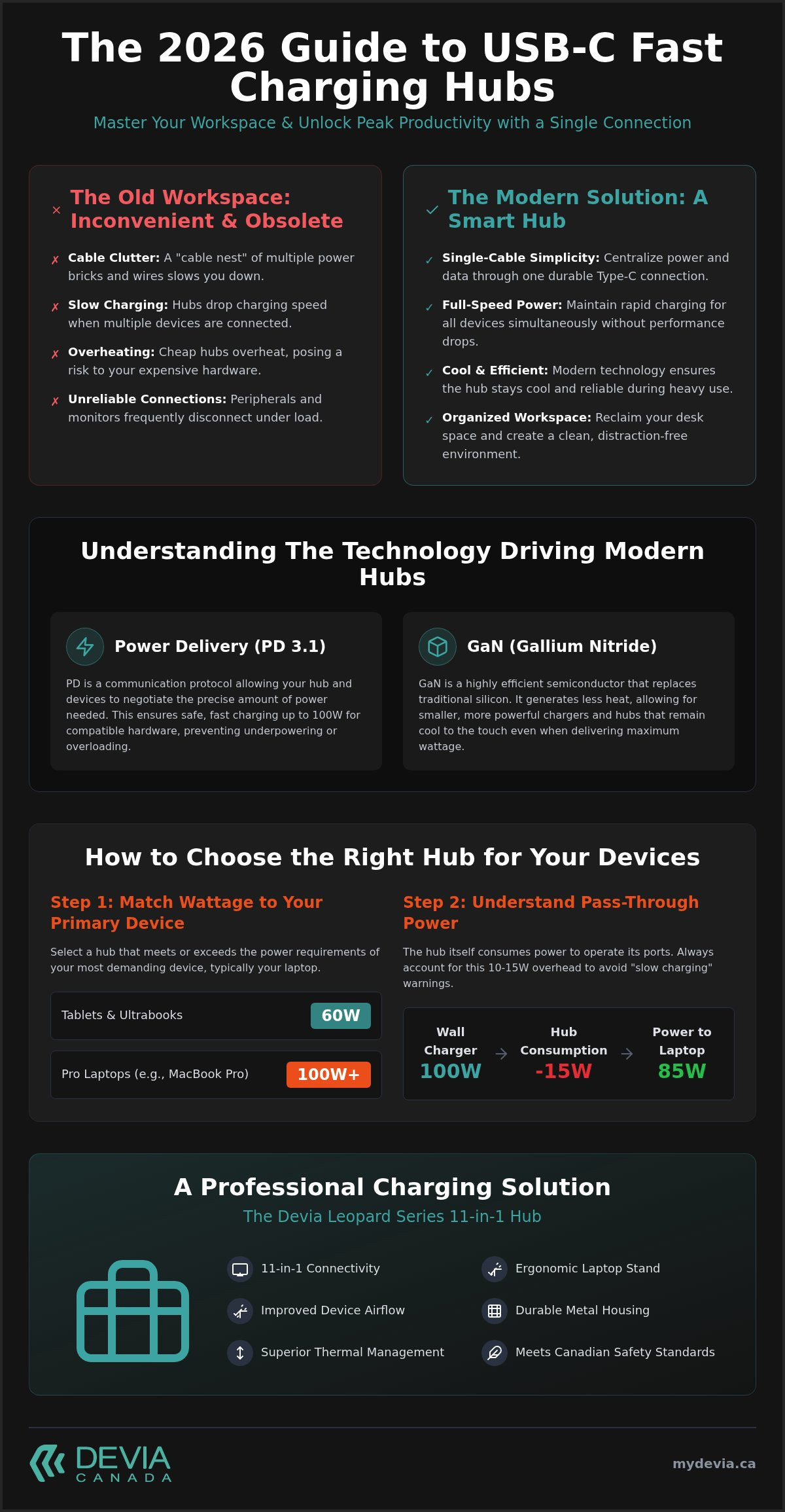
How to Choose the Right Hub for Your Devices
Selecting the correct usb c fast charging hub canada requires a methodical evaluation of your current and future hardware. Don't buy based on the number of ports alone. You must match the technical capabilities of the hub to the power and data requirements of your specific ecosystem. Follow these four steps to ensure compatibility.
- Step 1: Power Audit. Inventory your devices. A MacBook Pro may require 96W, while an iPhone 17 or Samsung Galaxy needs significantly less. Ensure the hub supports pass-through charging that exceeds your most demanding device's requirements.
- Step 2: Display Specs. Determine if you need 4K at 30Hz or 60Hz. For static office work, 30Hz is often sufficient. For video editing or creative design, 60Hz is essential for smooth motion.
- Step 3: Future-Proofing. Verify support for the latest standards. By 2026, your hub should handle the high-speed data transfer rates required by the newest flagship smartphones.
- Step 4: Build Material. Choose aluminum over plastic. Metal grey finishes aren't just for looks. They provide superior thermal management, preventing the hub from throttling speeds due to heat buildup.
Compatibility Checklist for 2026
Hardware standards move fast. Your hub must be ready for the iPhone 17. This includes supporting the latest charging protocols while you also protect your device with a high-quality iphone 17 case. For MacBook users, understand that while Thunderbolt ports are versatile, a dedicated USB-C hub is often a more cost-effective way to gain multiple ports. Samsung Galaxy and iPad Pro users should look for hubs that support Programmable Power Supply (PPS). This technology is necessary to achieve "Super Fast Charging" status without damaging the battery long-term.
Connectivity Needs
Professional creators in Canada often require integrated SD and Micro SD slots. These ports allow for quick transfers from cameras and drones without needing extra adapters. Legacy support remains important too. Ensure your hub includes at least two USB-A ports for wireless mouse receivers or older thumb drives. An 11-in-1 configuration is the professional standard for 2026. It provides enough variety to organize every peripheral, from external monitors to wired keyboards, through a single connection. This level of organization is what transforms a cluttered desk into a streamlined workstation. You can browse our full selection of professional hubs to find the right match for your setup.
The Devia Leopard Series: A Professional Charging Solution
The DEVIA USB C Laptop Docking Station Leopard Series (11 in 1) serves as the definitive usb c fast charging hub canada for the 2026 professional. It consolidates power, data, and video output into a single, high-performance unit. Unlike basic 6-port alternatives, this 11-in-1 smart hub is designed for users with complex workflows. It integrates a multi-port Type-C connection with an adjustable stand. Most hubs sit flat on a desk, which can trap heat and lead to hardware throttling. The Leopard Series lifts your laptop, creating a natural thermal corridor for improved airflow and sustained performance during heavy processing tasks.
The Metal Grey aesthetic is more than a design choice. It provides a professional finish that matches modern MacBook and premium Windows hardware. The aluminum chassis acts as a giant heat sink, drawing warmth away from sensitive internal chips. This structural integrity ensures the hub survives the rigours of daily use and the demands of national shipping. It is a functional, durable piece of hardware that organizes your workspace while protecting your investment. It eliminates the need for separate stands and adapters, creating a unified centre for your productivity.
Leopard Series Technical Highlights
Technical precision is the hallmark of the Leopard Series. It manages high-wattage power distribution with surgical accuracy. This allows you to fast-charge your laptop and smartphone simultaneously without the connection drops common in cheaper hardware. The construction is built for resilience. This durability is vital for maintaining the hub's integrity during transit across the country. Such precision engineering also protects your mobile peripherals. The stable, non-slip stand prevents the laptop from shifting. This keeps your display and your iphone 17 screen protector safe from accidental scratches or impacts during high-intensity work sessions.
Why Order from a Canadian Retailer?
Sourcing your technology within the country offers tangible benefits for your business continuity. You get reliable national shipping across all provinces, ensuring your home office is up and running without international delays or hidden customs fees. Canadian retailers understand local market conditions and provide support that aligns with national consumer protection standards. You also get direct access to the latest Leopard Series innovations and firmware updates. It is a logical, systematic approach to electronics that removes the guesswork from your professional setup. You can order your Leopard Series hub today to secure a faster, more organized workspace.
Upgrade Your Professional Workspace Today
Transitioning to a unified desk setup is the most efficient way to future-proof a workflow for the iPhone 17 and upcoming laptop generations. A reliable usb c fast charging hub canada must balance high-wattage Power Delivery with intelligent thermal management. Prioritizing aluminum construction and multi-port versatility ensures hardware stays cool and devices remain connected without interruption. These technical standards are essential for maintaining productivity in a high-performance environment.
The Leopard Series provides a comprehensive solution by combining an 11-in-1 docking station with an ergonomic stand. It features a professional Metal Grey finish and 11-in-1 multi-port versatility to simplify connectivity while maximizing power output. We provide fast national shipping across Canada to ensure rapid deployment for your home or corporate office.
Secure your hardware today. Shop the Devia Leopard Series 11-in-1 Docking Station Now and experience the utility of professional-grade engineering. It's time to realize the full potential of your devices with a hub designed for the modern Canadian professional.
Frequently Asked Questions
Is it safe to charge my iPhone 17 with a 100W USB-C hub?
Yes, it's completely safe to charge an iPhone 17 with a 100W hub. USB Power Delivery technology allows the phone to communicate with the hub and negotiate the exact amount of power required. The hub won't push 100W into the phone; instead, the iPhone only draws its maximum supported wattage, preventing overcharging or overheating during your work day.
What is the difference between a USB-C hub and a docking station?
The primary difference lies in power source and portability. A usb c fast charging hub canada is typically a compact, bus-powered device designed for travel. A docking station is a more permanent desktop solution that often requires its own external power brick to drive multiple high-resolution displays and high-speed peripherals simultaneously without draining your laptop's battery.
Do Devia hubs ship from within Canada?
Yes, all Devia products ship directly to customers from within Canada. This ensures reliable national shipping across all provinces and territories without the risk of international customs delays. Local shipping also means that customer support is localized for the Canadian market, providing a more efficient and reliable experience for professional users who need their gear quickly.
Can I use a fast charging hub for data transfer and charging at the same time?
Yes, you can use the hub for high-speed data transfer and charging at the same time. The internal controller manages power distribution to ensure your laptop receives a consistent charge while you transfer files from SD cards or external drives. This multitasking capability is the core benefit of a centralized workspace hub for busy professionals.
Will this hub work with both MacBook and Windows laptops?
Yes, the Leopard Series and other professional hubs are cross-platform compatible. They work seamlessly with MacBooks, Windows laptops, and even iPad Pro models. As long as your device has a Type-C port that supports Power Delivery and DisplayPort Alt Mode, the hub will provide full functionality across different operating systems and hardware brands.
Why does my USB-C hub feel warm during fast charging?
Warmth is a normal byproduct of the voltage conversion process during fast charging. Professional hubs use aluminum housings to pull heat away from internal components and release it into the air. This thermal management protects your hardware. If the hub feels warm, it's a sign that the metal casing is effectively dissipating heat as designed to prevent internal damage.
Do I need a special cable to realize fast charging speeds?
You must use a cable rated for the specific wattage of your hub and device to realize full speeds. For 100W charging, a standard 60W cable will act as a bottleneck. Look for cables with an E-marker chip that are certified for 100W or 240W to ensure the safest and most efficient power delivery possible for your professional equipment.
Does the Leopard Series hub support 4K monitor output?
Yes, the Leopard Series hub supports 4K monitor output through its integrated HDMI port. This allows you to connect your laptop to high-definition displays for a more productive workstation. Depending on your laptop's specific hardware capabilities, you can achieve crisp visuals for video editing, graphic design, or professional presentations without needing any extra adapters or software.