

The Complete Guide to Multi-Device Charging Stations for the Apple Ecosystem
2026 Jun 20th
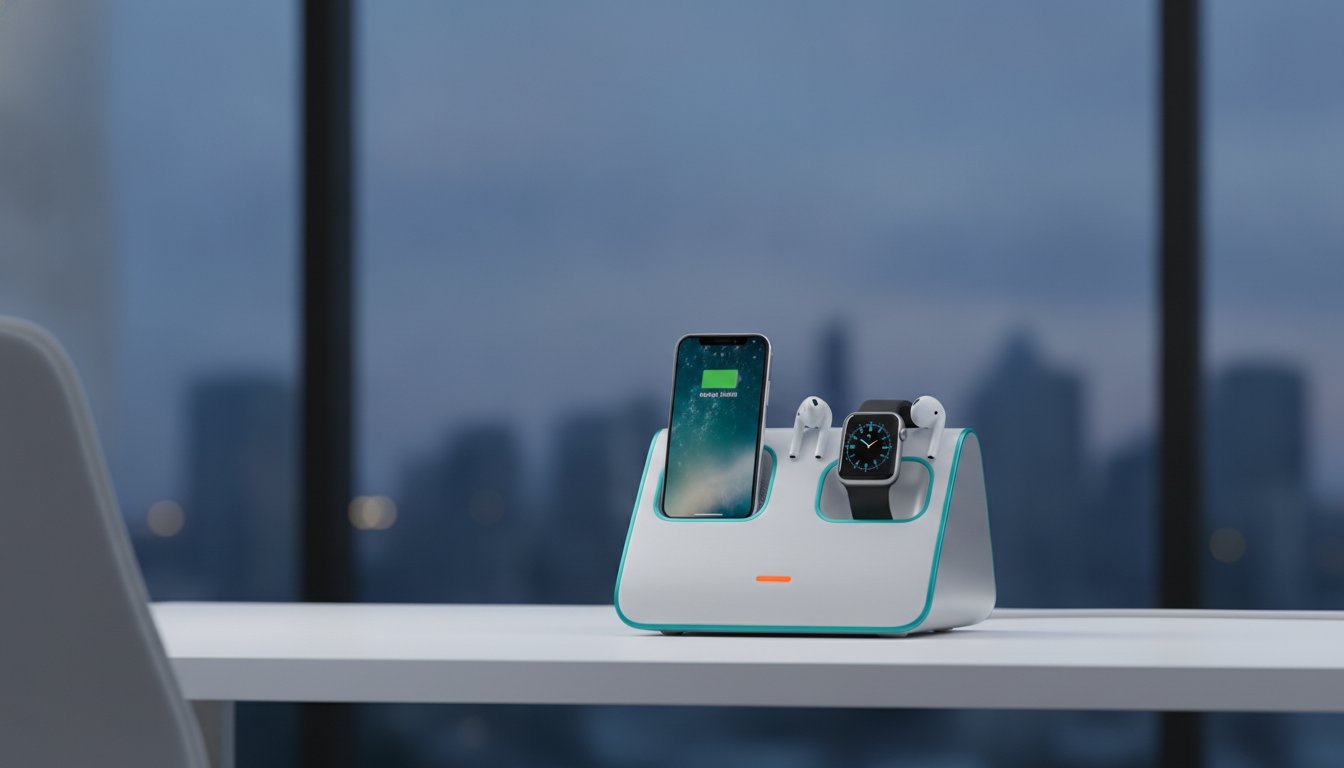
The average household now manages 11 connected devices, yet 67% of iPhone users still struggle with a messy tangle of individual cables every day. It's frustrating to see a premium desk or nightstand cluttered with cords, especially when low-quality hubs charge slowly or run dangerously hot. You've invested in the Apple ecosystem for its seamless integration, so your power setup should match that level of efficiency and reliability.
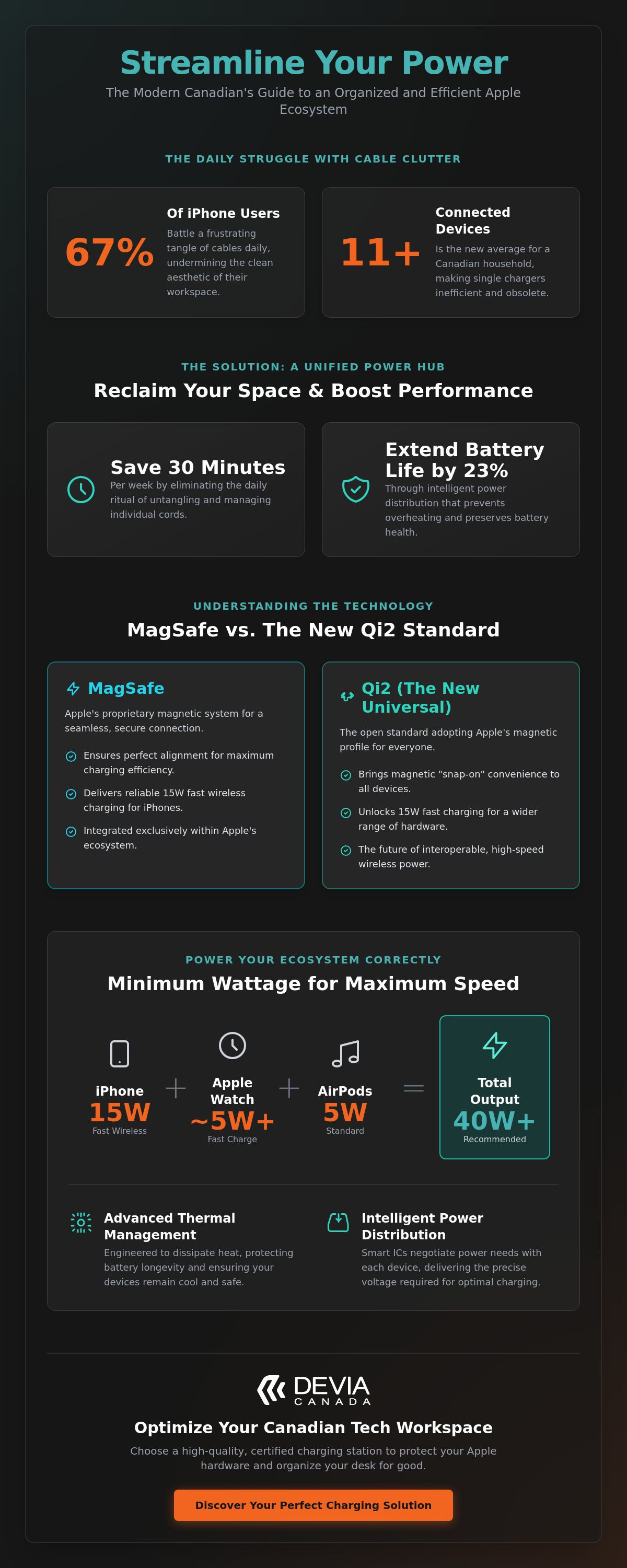
Finding the right multi-device charging station apple hardware requires is about more than just organization. It's about intelligent power management that preserves your expensive electronics. This guide will teach you how to streamline your workspace and protect your devices using the latest technology, including the new Qi2 standard. You'll learn how optimized charging protocols can actually extend your iPhone battery life by up to 23% while saving you roughly 30 minutes of cable management every week. We will break down essential technical specifications, from 15W fast-charging capabilities to thermal safety, ensuring your workspace remains organized and your devices stay healthy for the long term.
Key Takeaways
- Eliminate cable clutter on your desk or nightstand by transitioning from individual cords to a unified power hub.
- Identify the critical differences between MagSafe and the new Qi2 standard to select the most efficient multi-device charging station apple users require for 15W speeds.
- Determine whether a vertical stand or a multi-port smart hub best suits your specific workflow and notification needs.
- Protect the long-term battery health of your iPhone 17 and other hardware by implementing intelligent power distribution that prevents overheating.
- Optimize your Canadian workspace by integrating high-quality USB-C components to ensure a reliable and organized charging chain.
The Evolution of the Multi-Device Charging Station for Apple Users
The charging landscape has transformed from a fragmented collection of cables into a streamlined, centralized experience. For years, the average Canadian desk was defined by "cable spaghetti," a mess of white cords stretching toward a single power bar. This lack of organization wasn't just an aesthetic issue; it was a functional bottleneck. As the Apple ecosystem matured, users found themselves needing to power an iPhone, Apple Watch, and AirPods simultaneously. This shift necessitated a more robust solution. The modern multi-device charging station apple ecosystem supports is designed to handle high-demand hardware while maintaining a professional appearance.
Defining the Multi-Device Charging Station
A multi-device solution is generally defined by its ability to charge three or more items from a single wall plug. It's important to distinguish between passive stands and active docks. Passive stands are essentially plastic or metal frames that require you to thread your own cables through them. Active charging docks, however, feature integrated power delivery systems. These are essential for 2026 hardware, which requires sophisticated power distribution to maintain battery health. Much of this progress stems from the development of MagSafe technology. This magnetic alignment system ensures devices stay locked in the optimal charging position, preventing the "dead battery" surprise that often happens with standard wireless pads.
The Impact of Workspace Organization on Productivity
A clean workspace is more than just a visual preference; it has a direct impact on your focus. Research suggests that physical clutter can compete for your attention, making it harder to process information. By using a multi-device charging station apple users can reclaim their desk space and reduce cognitive load. Providing a dedicated "home" for your mobile devices creates a predictable routine. You know exactly where your phone is, and you know it's charging at peak efficiency. This integration into your workflow means you spend less time managing hardware and more time using it. Modern docks also emphasize material quality, using aluminum and soft-touch finishes that align with the premium feel of your devices.
Understanding the Technology: MagSafe, Qi2, and Intelligent Power
Selecting a multi-device charging station apple hardware relies on requires a technical understanding of how power moves from the wall to your battery. In 2026, the distinction between MagSafe and Qi2 has become a primary consideration for Canadian consumers. While MagSafe remains Apple's proprietary magnetic system, Qi2 serves as the new universal standard for magnetic charging, incorporating Apple's magnetic alignment technology to ensure high-efficiency power transfer across a broader range of hardware. This standardization means you no longer have to choose between brand-specific accessories and universal compatibility to achieve peak performance.
Intelligent power distribution is the invisible engine behind a high-quality hub. Without it, a charger might send too much current to a nearly full battery or starve a device that is at 1%. Modern stations use smart integrated circuits to communicate with your iPhone or Watch, negotiating the exact voltage required at any given millisecond. This precision prevents the overheating issues common in cheap, generic alternatives that lack sophisticated regulation. For power users who need to manage multiple peripherals, integrating a high-performance multi-port smart hub into your setup ensures that every connected device receives a stable, optimized charge.
Wattage and Charging Speeds Explained
For recent iPhone models, 15W is the "magic number" for fast wireless charging. Anything less will result in sluggish top-ups that can take hours. However, the total wattage of your station must be higher than 15W to support a full ecosystem. An Apple Watch Ultra or Series 10 requires a specific fast-charging module to reach 80% capacity in roughly 45 minutes. Meanwhile, AirPods typically require about 5W. To charge all three at maximum speed simultaneously, your multi-device charging station apple setup should ideally offer a total output of at least 30W to 40W. This headroom ensures no single device is throttled when the others are docked.
Thermal Management and Safety
Heat is the primary enemy of battery longevity. High-quality charging stations are engineered with advanced thermal dissipation systems to keep temperatures within safe operating limits. Following official lithium-ion battery safety guidelines is essential for protecting your hardware from long-term degradation. Materials play a significant role here; metallic finishes, such as Metal Grey aluminum, act as natural heat sinks to pull warmth away from the charging coils. Safety features like Foreign Object Detection (FOD) are also critical. FOD automatically cuts power if it detects metal items like keys or coins between the charger and your phone, preventing potential fire hazards and hardware damage.
Choosing Your Setup: Charging Stands vs. Multi-Port Smart Hubs
Selecting a multi-device charging station apple users prefer depends on the primary environment: the nightstand or the workstation. Vertical stands prioritize visibility and accessibility. Multi-port hubs prioritize connectivity and raw power delivery. Understanding the footprint and functional differences ensures you don't over-invest in features you won't use or end up with a setup that lacks essential ports for your specific workflow.
When to Choose a Dedicated 3-in-1 Stand
A dedicated stand is the ideal choice for bedside tables and minimalist desks where space is at a premium. These units utilize magnetic alignment to ensure your iPhone sits securely in landscape mode. This position is perfect for utilizing Apple's StandBy mode, turning your phone into a functional desk clock or photo gallery while it charges. Because these stands are designed with a specific vertical angle, you can view incoming notifications at a glance without picking up the device. They offer a stable, consistent overnight charging experience for your iPhone, Watch, and AirPods in one compact centre. The small footprint allows you to organize your space without the clutter of multiple individual bases.
The Power of the Multi-Port Hub
For power users, a simple wireless stand often isn't enough. Professional workflows require more than just power; they require data management. The Devia Leopard Series functions as both a high-performance docking station and a charger. This 11-in-1 solution allows you to manage high-speed data transfers, connect external displays, and provide fast charging through a single Type-C connection. It eliminates the need for separate dongles and individual chargers for your MacBook and iPhone. This setup is particularly effective for those who realize the value of a single, unified cable chain.
Professionals prefer this unified approach because it centralizes the entire tech stack. While a multi-device charging station apple stand is great for visibility, a smart hub handles the heavy lifting of a laptop-centric setup. You get the benefit of Metal Grey aesthetics and durable construction alongside technical versatility. This specific hub includes multiple ports for peripheral connectivity, allowing you to bridge the gap between your mobile accessories and desktop hardware. Portability is another factor. While stands are often bulky and best left on a desk, a compact multi-port hub can easily slide into a laptop bag for travel. It provides a consistent power delivery chain whether you're at your home office or a co-working space in the city centre.
Maximizing Battery Health and Safety Standards
Hardware protection is the foundation of device longevity. While Apple’s software manages charging cycles, the physical multi-device charging station apple users select must provide a stable, surge-protected current. Low-quality generic stations often fail to regulate voltage properly, leading to "trickle charging." This phenomenon occurs when a charger continues to push small amounts of power into a full battery, causing unnecessary heat and stress. High-quality hubs realize when a device is full and stop the current. This hardware-level intelligence is vital for preserving the chemical health of your hardware over several years of use.
Canadian consumers should prioritize units with recognized safety certifications to ensure workspace security. Look for the UL, CE, and RoHS marks on the product housing or technical specifications. These certifications confirm that the device has passed rigorous testing for fire safety and electrical stability. Cheap, uncertified hubs are a significant risk factor for overheating expensive electronics. Investing in a verified multi-device charging station apple ensures that your setup meets global standards for consumer electronics safety.
Battery Preservation Strategies
Maintaining your battery between 20% and 80% is the most effective way to slow down degradation. Smart hubs help organize this by providing consistent, moderated power rather than aggressive bursts. Ambient temperature also plays a critical role. If your charging centre is located in a sunlit area or a poorly ventilated corner, your Apple Watch battery may throttle its charging speed to prevent heat damage. Keep your station in a cool, dry environment to maximize efficiency and protect the delicate internals of your wearable devices.
Case Compatibility and Charging Efficiency
The physical distance between the charging coil and the device determines the speed of energy transfer. Most manufacturers recommend the "3mm rule," meaning any protective cover thicker than 3mm will significantly reduce efficiency. Using high-quality iPhone 17 cases designed for magnetic alignment ensures that the connection remains strong. If the magnets are weak, the device may shift slightly, causing the station to work harder and generate more heat. Similarly, ensure your Apple Watch band is positioned so it doesn't lift the sensor off the magnetic puck, which can interrupt the power flow and lead to inconsistent charging cycles.
Building Your Ultimate Canadian Tech Workspace
A logical flow from your laptop to your mobile accessories defines a high-performance environment. Your workspace should act as a cohesive system rather than a collection of separate parts. By centralizing power through a multi-device charging station apple ecosystem requirements demand, you eliminate the visual noise of excess cabling. This setup allows you to prioritize focus. High-quality USB-C cables are the backbone of this chain. Using inferior cords can bottleneck power delivery and data speeds, even if your primary hub is top-tier. Investing in durable, high-wattage cables ensures your setup remains compatible with future hardware iterations. It's a simple way to future-proof your desk against the next generation of devices.
To complete the aesthetic and functional integration of your workspace, you should also consider your peripherals. You can explore premium Apple Watch bands to ensure your wearable matches the professional design of your desktop hub. Material consistency across your devices creates a sense of corporate reliability and modern organization.
The Professional Desktop Configuration
Ergonomics should dictate the placement of your hardware. Position your multi-device charging station apple within reach but away from your primary mouse movement area. Using a docking station stand is a strategic way to save desk space while keeping your phone at an optimal viewing angle for notifications. Modern configurations rely on a single Type-C input to manage multiple accessories simultaneously. This reduces the strain on your laptop ports and creates a cleaner aesthetic. A well-organized desk centre reflects a disciplined approach to your professional tasks. It allows for a seamless transition between mobile use and deep desktop work.
Final Considerations Before Buying
Assess your current power brick wattage before finalizing your purchase. Most high-performance 3-in-1 stations require a 30W or higher wall adapter to realize their full fast-charging potential. If you use a lower-wattage brick, your devices will charge significantly slower, or the station may fail to power all devices at once. Portability is another factor for the Canadian traveller. Look for compact, foldable designs that can transition from a home office to a briefcase without adding unnecessary bulk. A versatile hub should be as functional on the road as it is at your primary workstation.
Upgrade your workspace with Devia high-performance hubs to ensure your Apple ecosystem is powered safely and efficiently.
Streamline Your Power Infrastructure
As Canadian-based tech hardware experts, we offer tools designed for the modern professional. The Leopard Series 11-in-1 stand provides fast-charging capability and specialized protection for iPhone 17 and 16 models. It functions as a durable centrepiece for any organized office. Browse Devia Multi-Port Smart Hubs and Docking Stations to upgrade your desktop configuration. Achieving a perfectly organized and safely powered workspace is within reach.
Frequently Asked Questions
Is it safe to charge my iPhone, Apple Watch, and AirPods on one station?
Yes, it's completely safe when using a high-quality multi-device charging station apple users trust. Professional-grade stations include integrated circuits that manage heat and prevent overcharging. These units also feature Foreign Object Detection (FOD), which automatically cuts power if metal items like coins or keys are detected near the coils. This ensures your hardware remains protected throughout the night.
Will a multi-device charging station charge as fast as the original Apple charger?
Fast charging is possible if the hardware meets specific technical standards. To match original speeds, the station must support 15W for iPhone and include a dedicated fast-charging module for the Apple Watch. The total speed often depends on the wall adapter you use; a 30W or higher brick is usually necessary to power all modules at peak performance simultaneously.
Do I need to remove my iPhone case to use a magnetic charging station?
You don't need to remove your case if it is MagSafe compatible or less than 3mm thick. Standard plastic or silicone cases usually allow power to pass through, though they may slightly reduce charging efficiency. However, cases with metal plates, ring holders, or credit card slots must be removed to avoid interference and potential overheating during the induction process.
What is the difference between a charging station and a docking station?
A charging station is designed primarily for power delivery, whereas a docking station expands your device's connectivity. Charging stands are ideal for nightstands and minimalist desks. Docking stations, like the Leopard Series 11-in-1, include ports for HDMI, USB data, and SD cards, making them the preferred choice for professional workstation centres where data transfer is a priority.
Can I use a multi-device station with non-Apple products?
Most stations are compatible with any device that supports the Qi or Qi2 wireless standard. This includes many Samsung Galaxy phones and various wireless earbuds from other manufacturers. While the magnetic alignment is optimized for the Apple ecosystem, the underlying induction technology is a universal industry standard that works across different brands.
Why is my multi-device charger getting warm during use?
Mild warmth is a standard byproduct of the induction process. Energy transfer between coils creates heat, which is why premium stations use aluminum or Metal Grey finishes to act as heat sinks. If the device becomes hot to the touch or stops charging, it may indicate a misalignment or an incompatible case that is forcing the coils to work harder.
How much wattage does a 3-in-1 Apple charging station require?
A 3-in-1 setup typically requires a minimum of 30W to 35W of input power. This allows the multi-device charging station apple hardware to allocate 15W to the iPhone, 5W to the Apple Watch, and 5W to AirPods, with enough headroom for internal overhead. Using a standard 5W or 12W iPhone brick will result in failed or extremely slow charging across multiple ports.
Does using a third-party charging station void my Apple warranty?
No, using a third-party accessory does not void your hardware warranty. Apple's warranty remains intact as long as the accessory itself does not cause physical damage to the device. Choosing certified hardware with UL or CE marks ensures that the power delivery meets the safety standards required to protect your electronics over the long term.