

Notebook Docking Stations: The Professional Guide to Laptop Connectivity in 2026
2026 Jul 11th
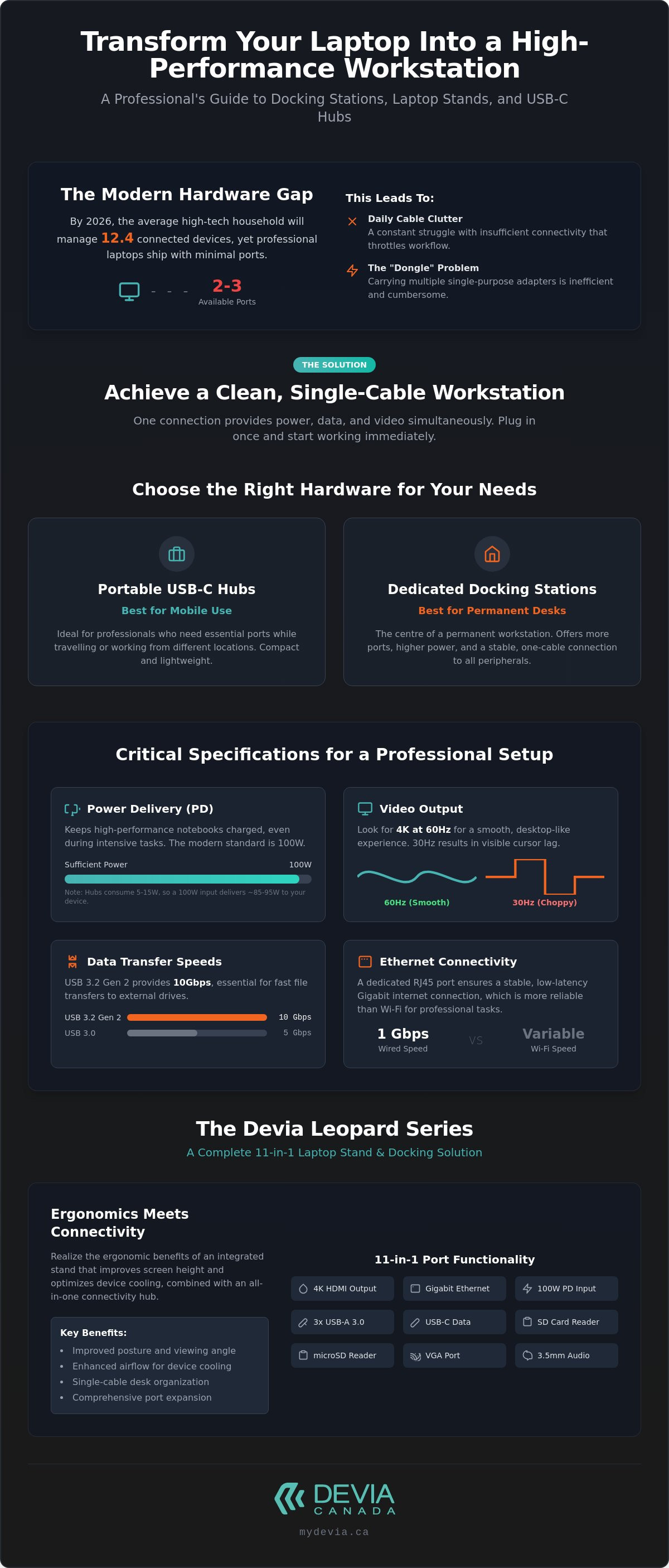
By 2026, the average high-tech household manages 12.4 connected devices, yet most professional laptops still arrive with only two or three ports. This hardware gap creates a daily struggle with cable clutter and insufficient connectivity that throttles your workflow. You shouldn't have to choose between charging your device and connecting a second monitor.
It's frustrating when a premium notebook feels limited by its own portability. You likely want a clean, organized desk where your hardware stays cool and your batteries stay full. This professional guide from Devia Canada explains how to realize that vision. You'll discover how to transform your portable laptop into a high-performance workstation using a professional laptop stand with a USB hub, a solution Canadian residents increasingly rely on to maximize efficiency. We'll cover the shift toward USB4 standards, the cooling benefits of integrated stands, and how to achieve a seamless multi-monitor setup with a single cable.
Key Takeaways
- Differentiate between portable USB-C hubs and dedicated docking stations to choose the right hardware for permanent desk integration or mobile use.
- Identify critical specifications like high-wattage Power Delivery and 4K video output to ensure your setup supports modern high-performance notebooks.
- Realize the ergonomic benefits of using a laptop stand with usb hub canada professionals trust to improve screen height and optimize device cooling.
- Implement effective cable management and workspace organization strategies to eliminate clutter and maintain a streamlined, professional aesthetic.
- Explore the comprehensive 11-in-1 functionality of the Devia Leopard Series for an all-in-one connectivity and fast-charging solution.
Understanding Notebook Docking Stations and Modern Connectivity
A Docking station serves as the central hub for your entire workspace. It's no longer just a luxury. It's a necessity. As manufacturers prioritize thin profiles, they remove essential ports. A single notebook port must now expand into a full array of connections. This includes HDMI, Ethernet, and multiple USB-A slots. You need these to maintain professional productivity in a high-performance environment.
The industry has moved away from proprietary mechanical docks. Those bulky plastic bases only worked with specific laptop models. Today, we use universal USB-C and Thunderbolt standards. This shift allows you to use the same hardware across different brands. It's a more sustainable and efficient approach to office technology. If you're looking for a high-quality laptop stand with usb hub canada offers many options that combine physical support with technical expansion. These devices provide the stability of a desktop with the flexibility of a mobile workstation.
The Evolution of the Portable Workstation
Thinner laptop designs created the "dongle" challenge. Users often carry a bag full of adapters just to connect a mouse or a projector. This is inefficient. The modern solution is a single-cable setup. One connection provides power, data, and video simultaneously. A permanent desk setup is superior to mobile adapters. It offers better stability and higher bandwidth. You don't have to reconfigure your peripherals every morning. You just plug in one cable and start working immediately. This streamlined workflow reduces daily friction and improves focus.
Universal Compatibility: USB-C vs. Thunderbolt
Don't confuse the physical connector with the underlying data protocol. Both use the same oval shape. However, their capabilities differ. Thunderbolt 4 and 5 offer the highest data transfer speeds, reaching up to 80 Gbps in 2026. USB-C is more common and highly versatile for general office tasks. Most modern devices support cross-platform utility. This means your dock will likely work with a MacBook, a Windows laptop, or even a ChromeOS device.
Identify your laptop port capabilities by looking for specific symbols. A lightning bolt indicates Thunderbolt support. A "D" or "DP" logo signifies DisplayPort Alt Mode. Knowing these details helps you choose the right equipment for your specific hardware. Using a laptop stand with usb hub canada ensures your device stays at eye level while staying connected to every essential accessory. It's about merging physical ergonomics with digital performance.
Key Features to Evaluate for Your Desk Setup
Selecting hardware requires looking past the number of ports. You need to evaluate the performance standards of those connections. A high-quality laptop stand with usb hub canada professionals rely on must balance high-speed data with reliable power. These are the core features to prioritize:
- Power Delivery (PD): Keeps your notebook charged via the hub connection.
- Video Output: Support for 4K resolution at 60Hz for smooth visuals.
- Data Transfer Speeds: USB 3.2 Gen 2 for 10Gbps transfers to external drives.
- Ethernet Connectivity: A dedicated RJ45 port for stable, low-latency internet.
Power Delivery and Charging Efficiency
Pass-through charging is the most common method for portable hubs. It allows your laptop's original charger to connect to the hub, which then powers the laptop. The hub itself usually consumes 5W to 15W for its own operations. This means a 65W charger might only deliver 50W to your device.
A 100W PD port has become the modern standard. It ensures high-performance notebooks don't lose battery during intensive tasks like video editing or 3D rendering. Without sufficient wattage, your laptop might drain even when plugged in. Checking the specifications on a multi-port smart hub ensures your hardware remains powered throughout the workday.
Display Expansion and Resolution Standards
Video output is where many budget options fail. Many hubs support 4K resolution but only at a 30Hz refresh rate. This results in a choppy cursor and visible lag during window transitions. Professionals should look for 4K at 60Hz to ensure a smooth, desktop-like experience.
Consider whether you need a single or dual monitor setup. HDMI 2.1 and DisplayPort 1.4 are the current benchmarks for high-resolution stability. Ensure your cables match these versions. If you use an older version 1.2 cable on a 2.1 port, you'll throttle your resolution. Extended desktop mode is also essential. Unlike mirror mode, which duplicates your screen, extended mode provides unique workspace on each monitor. This is critical for managing spreadsheets on one screen while attending a meeting on the other.
Stable connectivity requires a physical port. While Wi-Fi is standard, an RJ45 Ethernet port offers the low latency needed for professional video conferencing. Pair this with USB 3.2 Gen 2 ports. These support 10Gbps transfer speeds, making them ideal for high-speed external SSDs. This combination of power, video, and data creates a truly professional workstation.
USB-C Hubs vs. Dedicated Docking Stations
Choosing between a portable hub and a dedicated docking station depends on your primary workspace. Hubs are passive tools. They expand your port options on the go. Docking stations are active components. They're designed for permanent desk integration and managing high-bandwidth tasks. The distinction matters for both performance and hardware longevity.
Thermal management is a significant differentiator. Small, plastic USB-C hubs often struggle with heat dissipation. When you connect a 4K monitor and an external drive, the internal temperature rises. This can lead to connection drops or data throttling. Professional docking systems use larger metal housings. These act as heat sinks. A premium laptop stand with usb hub canada users prefer often features an aluminum alloy chassis. This design keeps the internal chips cool during extended use. It ensures your peripherals stay connected without interruption.
Port variety also separates these categories. A basic hub might offer a 4-in-1 configuration. This usually includes a couple of USB-A ports and one HDMI slot. A comprehensive 11-in-1 system provides much more. It includes Ethernet, SD card readers, and multiple high-speed data ports. It transforms a single notebook connection into a full desktop array. This level of expansion is essential for creators and data-heavy professionals.
When to Choose a Portable Smart Hub
Mobile professionals and students benefit most from compact hubs. These devices prioritize weight and size. They fit easily into a laptop bag or pocket. However, they have limitations. Most portable hubs lack the power output required to charge high-performance notebooks at full speed. They also struggle with multi-monitor stability. If you only need to plug in a thumb drive or a single projector occasionally, a hub is sufficient. It's a lightweight solution for temporary connectivity.
The Case for a Stationary Docking Solution
A stationary dock protects your investment. Repeatedly plugging and unplugging peripherals causes wear and tear on your notebook ports. A docking station centralizes these connections. You leave your printer, webcam, and mechanical keyboard plugged into the dock. You only interact with a single cable. This approach organizes your desk and centres your workflow. It creates a dedicated environment where you can focus on complex tasks without managing a mess of cables. It's the standard for any professional Canadian home office in 2026.
Optimizing Your Workspace for Maximum Productivity
Workspace optimization requires a balance between physical positioning and digital efficiency. A cluttered desk often leads to fragmented focus. You need a system that handles both your hardware connections and your physical comfort. While previous sections focused on data protocols, this section explores how to arrange these tools for peak performance. A professional laptop stand with usb hub canada residents use can transform a cramped desk into a streamlined centre of operations.
Effective cable management is the first step toward a clean aesthetic. By centralizing all peripherals into a single hub, you eliminate the "octopus" of wires typically found behind a notebook. One cable connects to your laptop; your monitors, keyboard, and printer stay permanently routed through the stand. This setup allows you to dock and undock in seconds without managing individual connectors. It also reduces the risk of damaging your laptop ports through repetitive use.
Ergonomics and Screen Alignment
Most users place their laptops directly on the desk surface, which forces a downward gaze. This posture leads to significant neck and shoulder strain over long workdays. Raising the device to eye level encourages a neutral spine position. You should align your laptop screen with your external monitors to create a seamless visual field. This reduces the eye fatigue caused by constantly refocusing between different heights.
An elevated stand also improves the quality of your professional calls. It brings the integrated webcam to eye level, providing a more natural angle for video conferencing. Integrated designs are particularly beneficial for small desks. They combine the footprint of a stand with the utility of a hub, saving valuable square centimetres of workspace. For a complete all-in-one solution, you can find the Leopard Series docking station that manages these ergonomic and technical needs simultaneously.
Thermal Performance and Device Longevity
Thermal throttling is a common issue for high-performance notebooks during heavy workloads. When internal temperatures rise, the system slows down the processor to prevent damage. Metal housings, particularly those made from aluminum alloy, help pull heat away from the docking station's internal chips. This passive cooling ensures that your data transfer speeds remain consistent even when multiple 4K displays are active.
Physical airflow is equally important for the laptop itself. Elevated stands provide a clear path for cool air to reach the intake vents located on the bottom of most professional notebooks. You must ensure your notebook has adequate space for fan exhaust to prevent hot air from recirculating. This combination of active heat dissipation from the dock and improved air intake for the laptop extends the lifespan of your hardware. It ensures your system maintains its maximum clock speed throughout the workday.
The Devia Leopard Series: A Complete 11-in-1 Solution
Devia Canada provides the Leopard Series as a comprehensive answer to the connectivity challenges modern professionals face. It isn't just an accessory; it's a centralized foundation for your desk. This specific laptop stand with usb hub canada professionals rely on integrates an ergonomic riser with a sophisticated 11-port smart hub. The Metal Grey finish is a calculated aesthetic choice. It complements premium hardware while maintaining the high standard of professional retail design expected from Devia Canada.
Versatility is the primary feature of this hardware. The 11-in-1 configuration offers every connection necessary for a high-performance workstation without requiring separate adapters. The Leopard Series includes:
- 4K HDMI: Supports high-resolution external displays for detailed creative work.
- Multiple USB-A Ports: Connects legacy peripherals like mice, keyboards, and printers.
- High-Speed USB-C: Facilitates modern data transfer and device connectivity.
- SD and TF Card Slots: Allows media professionals to offload footage and photos quickly.
- RJ45 Ethernet: Provides a secure, wired network connection for low-latency conferencing.
Design Meets Functionality
The structural integrity of the Leopard Series metal frame ensures stability for notebooks of various sizes. It eliminates the need for a bag full of disparate adapters, effectively streamlining your mobile kit and permanent desk. When building a complete device strategy, you can refer to The Complete Guide to Multi-Device Charging Stations for the Apple Ecosystem to see how this hub integrates with other Devia Canada solutions. The design prioritizes durability, ensuring the stand remains shake-free during intensive typing or screen adjustments.
A Smart Hub for the Canadian Professional
In high-demand environments, the Leopard Series excels by supporting rapid data transfers and efficient power distribution. It ensures your notebook receives consistent fast charging while powering all connected peripherals simultaneously. This prevents battery drain during the resource-heavy tasks like 4K exporting mentioned in previous sections. For those in urban centres where wireless signals often fluctuate, the wired Ethernet port provides the reliability required for uninterrupted video conferencing. Devia Canada focuses on providing tools that bridge the gap between portable convenience and desktop-grade performance. Upgrade your workstation with the Leopard Series 11-in-1 Docking Station today.
Future-Proof Your Workspace Efficiency
Modern productivity relies on a balance between technical bandwidth and physical comfort. You've seen how the right connectivity standard can transform a single notebook port into a full desktop array. Transitioning to a centralized hub prevents port wear and tear while ensuring your device remains cool under heavy workloads. This systematic approach to hardware management is what separates a cluttered desk from a high-performance workstation.
Finding a reliable laptop stand with usb hub canada professionals trust is essential for maintaining a clean, organized desk. The Leopard Series delivers 11-in-1 multi-port efficiency and an integrated ergonomic stand, all housed in a premium Metal Grey professional design. This hybrid solution addresses every common pain point, from cable clutter to thermal throttling, in one streamlined unit. It's the most effective way to upgrade your setup for the technical demands of 2026.
Shop the Leopard Series 11-in-1 USB-C Docking Station & Stand today to streamline your daily workflow. You don't have to compromise on speed or comfort when you have the right tools at the centre of your desk. It's time to realize the full potential of your portable workstation with confidence.
Frequently Asked Questions
Do notebook docking stations work with all laptop brands?
Most modern docking stations work across different brands if your device supports USB-C or Thunderbolt protocols. This universal standardisation allows a single unit to serve MacBook, Windows, and ChromeOS devices effectively. You should check your laptop port specifications for a DisplayPort (DP) or lightning bolt logo. These symbols confirm the port handles video and power alongside standard data transfers.
Can a docking station charge my laptop while I work?
Yes, docking stations equipped with Power Delivery (PD) technology charge your laptop through the same cable used for data. A professional laptop stand with usb hub canada residents buy usually supports up to 100W PD. This ensures your battery remains full even during resource-heavy tasks like video editing. You must use a compatible high-wattage power adapter to enable this fast-charging feature.
What is the difference between a USB-C hub and a docking station?
USB-C hubs are compact, bus-powered tools designed for occasional port expansion while travelling. Docking stations are robust, stationary solutions built for permanent desk integration and high-bandwidth tasks. Docks typically offer superior thermal management and a wider array of ports, such as dedicated Ethernet and multiple video outputs. They provide the stability needed for a full desktop replacement at your primary workspace.
How many monitors can I connect to a single docking station?
The number of monitors depends on the docking station hardware and your laptop graphics capabilities. Many professional units support dual 4K displays at 60Hz. Some advanced models even allow for triple monitor setups. Always verify if your laptop supports Extended Desktop mode rather than just Mirror mode. This ensures you can manage unique content on every connected screen for better multitasking.
Does using a docking station affect my internet speed?
A docking station won't slow your internet; it actually provides a more stable connection via a dedicated RJ45 Ethernet port. Wired connections eliminate the latency and interference often found with Wi-Fi in busy Canadian office buildings. This is critical for consistent speeds during professional video conferencing. Your overall speed still depends on your local internet service provider plan and hardware limits.
Is a 4K 60Hz HDMI port important for office work?
A 4K 60Hz HDMI port is vital for reducing eye strain and ensuring smooth cursor movement. Budget hubs often limit 4K output to 30Hz, which causes visible lag and choppiness during window transitions. For professional office work, 60Hz provides a desktop-like experience that feels responsive. It's a standard requirement for anyone spending eight hours a day in front of a high-resolution monitor.
Can I use a docking station with a MacBook Pro?
You can absolutely use a docking station with a MacBook Pro. Apple's shift to Thunderbolt and USB-C ports makes these devices highly compatible with modern hubs. Using a laptop stand with usb hub canada professionals prefer helps manage the limited port selection on newer MacBooks. It allows you to connect external drives, monitors, and SD cards through a single, reliable connection that simplifies your workflow.
Why does my docking station get warm during use?
It's normal for a docking station to feel warm as it converts power and manages high-speed data streams. High-performance chips generate heat when driving 4K displays or transferring files at 10Gbps. Premium metal housings are designed to act as heat sinks, pulling warmth away from internal components to protect the hardware. This heat dissipation ensures consistent performance and prevents throttling during long, intensive workdays.