

IPad Screen Protector: The Professional Reference for Display Protection in 2026
2026 Jun 27th
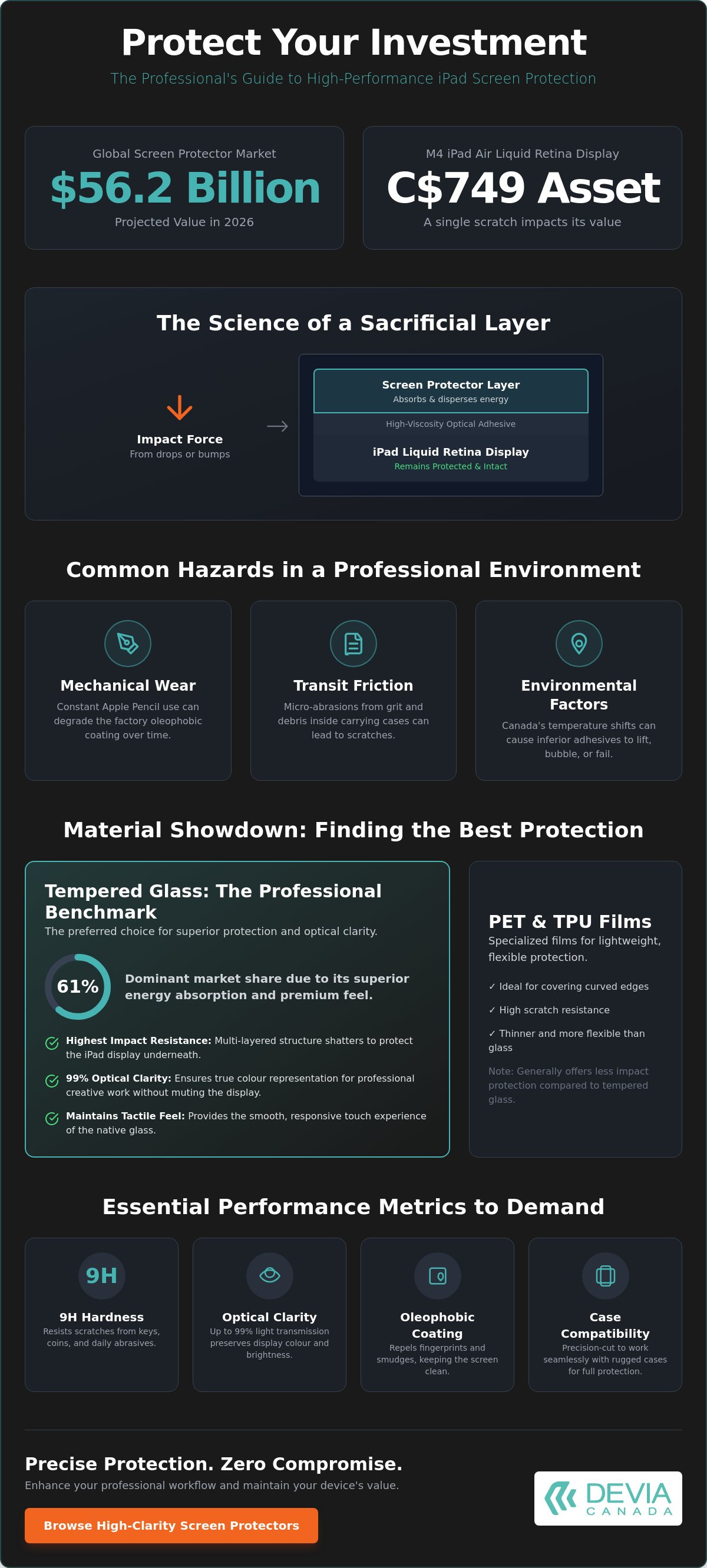
With the global screen protector market projected to reach $56.2 billion in 2026, selecting a high-performance ipad screen protector is a technical necessity. For professionals using the M4 iPad Air, a single scratch on a Liquid Retina display is more than a cosmetic flaw; it's a direct hit to a C$749 asset.
You likely realize that choosing display protection often involves a trade-off between optical clarity and physical durability. Bubbles during installation or a loss of Apple Pencil sensitivity can quickly turn a premium device into a source of professional frustration. This reference provides the technical specifications and material science required to protect your iPad display without compromising touch precision or professional aesthetics.
We will examine 9H hardness ratings, anti-fingerprint coatings, and the specific material blends that ensure compatibility with rugged cases and the latest Apple hardware. Precise protection. Zero compromise.
Key Takeaways
- Define the ipad screen protector as a sacrificial layer engineered to absorb impact energy and protect Liquid Retina displays.
- Contrast the durability of tempered glass against the lightweight scratch resistance of PET and TPU films.
- Decode technical specifications, specifically the 9H pencil hardness scale and the utility of oleophobic coatings.
- Achieve a professional, bubble-free installation by ensuring the shield is centred for compatibility with rugged iPad cases.
- Enhance workflow efficiency by pairing high-clarity display protection with external docking and connectivity solutions.
Understanding iPad Screen Protector Technology and Display Vulnerability
An ipad screen protector is a precision-engineered sacrificial layer. It's designed to absorb impact energy and surface abrasion before they reach the device's native glass. While Apple's hardware technology continues to advance, modern Liquid Retina and OLED displays are thinner than ever to accommodate slimmer device profiles. This thinness increases vulnerability to localized pressure. Even with the latest glass compositions, the screen remains the most fragile component of the tablet ecosystem.
In the Canadian market, hardware maintenance is a calculated investment. The resale value of a 13-inch M4 iPad Air can fluctuate by hundreds of dollars based on screen condition alone. Beyond financial recovery, the structural integrity of the glass is at stake. Micro-abrasions, often caused by microscopic quartz particles found in common dust, act as stress concentrators. These tiny flaws can lead to catastrophic failure under minimal stress, turning a minor bump into a costly repair.
The Science of Sacrificial Layers
Effective protection relies on energy displacement. When an object impacts the surface, the protector disperses the force across its material structure rather than allowing it to penetrate the device glass. Many high-performance screen protector materials utilize high-viscosity optical adhesives. This creates a molecular-level bond that preserves touch sensitivity and visual clarity. For professionals, this clarity is non-negotiable. Any distortion in the display can lead to errors in colour grading or fine-detail illustration. A mint-condition screen is required for the visual accuracy that professional workflows demand.
Common Hazards in the Professional Environment
Professional environments present a unique set of hazards that can degrade a display over time. Repetitive stylus use and specific touch gestures create localized friction that factory coatings can't always withstand.
- Mechanical Wear: Constant Apple Pencil use creates friction that can eventually degrade the factory oleophobic coating.
- Transit Friction: Moving between a home office and a corporate centre exposes the device to grit and debris inside carrying cases or backpacks.
- Environmental Factors: Canada's extreme temperature shifts are a significant factor. Rapid transitions from cold outdoor air to dry, heated indoor spaces can cause inferior adhesives to lift or bubble.
Using an ipad screen protector ensures that these everyday variables don't result in permanent hardware damage. It maintains the device in a factory-fresh state, ensuring both functional longevity and maximum trade-in value when it's time to upgrade your hardware. For those who require expert restoration for existing damage, services such as iPhone screen repair London provide a professional benchmark for high-quality mobile maintenance.
When you are ready for an upgrade, sourcing high-quality refurbished devices from specialized centres like iPhone Kliniek ensures you receive hardware that has been professionally vetted and maintained.
Comparing Materials: Finding the Best Protection for Screen
Selecting the right material for an ipad screen protector requires balancing physical durability with optical performance. The market currently offers four primary categories: tempered glass, PET films, TPU films, and specialized matte or privacy filters. Each material serves a specific functional purpose within a professional workflow.
Tempered glass holds a dominant 61% market share for a reason. It provides the highest level of impact resistance while maintaining the original tactile feel of the device. For users in Canada, where high-end iPad models represent a significant investment, the material choice directly impacts the longevity of the hardware.
Tempered Glass: The Professional Benchmark
Professionals prefer tempered glass screen protectors because they offer superior energy absorption. According to academic research on impact resistance, the multi-layered structure of tempered glass allows it to shatter safely while keeping the underlying iPad display intact. This is critical for the latest OLED panels where repair costs are high.
Optical clarity is another vital metric. Premium glass options aim for 99% light transmission. This ensures that the vivid colours and deep blacks of the iPad display aren't muted. These protectors are often designed with case-friendly dimensions, ensuring they integrate seamlessly with rugged covers for 360-degree security. If you want to maintain the premium feel of your device, you can browse high-clarity screen protectors designed for the latest models.
Specialized Films for Niche Applications
While glass is the benchmark, specialized films address specific environmental challenges. PET and TPU options are lightweight and flexible, making them ideal for covering curved edges or providing basic scratch resistance without adding bulk. However, they lack the impact protection found in glass.
- Paper-like Matte Protectors: These use micro-bead technology to simulate the friction of paper. They're essential for artists and students who require precise control with the Apple Pencil. The trade-off is a slight reduction in optical sharpness.
- Privacy Filters: These utilize micro-louver technology to narrow the viewing angle. In open-concept Canadian offices or on public transit, they ensure that sensitive data remains visible only to the person directly in front of the screen.
- Anti-Glare Coatings: Specialized matte films reduce reflections in brightly lit centres or outdoor environments, preventing eye strain during long working sessions.
Choosing an ipad screen protector isn't just about avoiding scratches. It's about optimizing your device for your specific professional environment. Whether you prioritize the impact resistance of glass or the texture of a matte film, the goal remains the same: functional utility without compromise.
Essential Performance Metrics for iPad Screen Protection
Technical performance is measured by specific standardized metrics. For the 2026 iPad Air M4 or iPad Pro, choosing a protector isn't a subjective preference. It's a matter of quantifiable data. Four primary metrics define the utility of professional-grade protection: surface hardness, chemical coating durability, touch response latency, and safety containment. Understanding these specifications allows you to select an ipad screen protector that maintains the functional integrity of your hardware.
Deciphering the 9H Hardness Claim
The 9H hardness rating is frequently misunderstood. It refers to the Pencil Hardness Scale (ASTM D3363), where a 9H lead is the hardest available. It doesn't correspond to a 9 on the Mohs scale of mineral hardness, which would imply the hardness of a sapphire. A true 9H ipad screen protector, such as a precision-cut IPG screen protector, will resist scratches from most common metal objects like keys or coins. Lower-quality plastic alternatives often fail this test, showing visible gouges under minimal pressure. When you realize that 9H is a measure of scratch resistance rather than absolute shatterproofing, you can better manage your expectations for device durability.
Maintaining Display Hygiene and Clarity
Oleophobic coatings are the primary defence against display degradation in high-touch environments. This chemical layer repels skin oils and prevents fingerprint smudges from obscuring visual data. In a professional setting, a smudge-free display is critical for client-facing presentations or detailed colour grading. Most premium coatings maintain their effectiveness for approximately 12 months of heavy use. After this period, the friction from repetitive touch gestures and cleaning may begin to wear down the layer. This often results in a "sticky" feel or increased smudge retention, indicating it's time for a replacement.
Touch sensitivity must remain absolute. High-performance protectors use ultra-thin, conductive adhesives to ensure zero latency. This is particularly vital for the latest iPad models featuring high-precision digitizers. Any delay in the communication between the Apple Pencil Pro and the screen surface can disrupt a creative professional's flow. Additionally, anti-shatter technology is a functional safety requirement. This involves an internal PET film layer that holds glass fragments in place if the protector sustains a heavy impact. It prevents sharp shards from damaging the underlying Liquid Retina display or causing injury during the removal process.
- 9H Hardness: Resistance to surface scratches from materials with a lower hardness rating.
- Oleophobic Layer: Fluorinated coating that reduces oil adhesion and simplifies cleaning.
- Latency Control: Adhesive thickness calibrated to maintain 1:1 touch response.
- Safety Film: Internal laminate that prevents glass dispersion upon failure.
Installation and Ecosystem Compatibility
Installing an ipad screen protector on a large-format display requires more precision than a standard smartphone application. The increased surface area provides more opportunities for dust entrapment and misalignment. Professional results depend on environmental control and specific alignment techniques. Whether you need to choose and install an iPhone 16 screen protector or a 13-inch iPad equivalent, the principles of surface preparation remain identical.
Achieving a Perfect Application
A clean environment is the first technical requirement. Working in a humid space, such as a bathroom after a hot shower, helps ground airborne dust particles. Use the provided microfibre cloths and dust-removal stickers to ensure the glass is pristine before proceeding. For large tablet displays, the "hinge method" is the most reliable alignment strategy. This involves using adhesive tape to secure the protector to the side of the iPad. This creates a book-like hinge that ensures the shield drops into the exact centre every time.
Troubleshooting trapped debris requires a steady hand. If you spot a dust spec after the adhesive has engaged, use a "lift and tuck" approach. Gently raise the nearest corner with a plastic tool. Slide a dust sticker under the glass to capture the particle, then let the protector settle back into place. Avoid using your fingernails. This can damage the silicone adhesive layer and cause permanent bubbling at the edges.
Ensuring Case and Accessory Synergy
Compatibility extends beyond the glass surface. Most professional-grade protectors feature a "case-friendly" cut. This design leaves a 1mm to 2mm gap between the edge of the glass and the device frame. This clearance prevents rugged cases from pushing against the protector, which would otherwise cause the edges to lift and compromise the seal. Maintaining this gap is essential for the long-term durability of your hardware setup.
Accessory performance is equally critical. A high-quality ipad screen protector must not interfere with the Apple Pencil Pro. The material must be thin enough to maintain full pressure sensitivity and tilt functions for digital illustration or note-taking. To complete your professional hardware suite, you can pair your device with an Apple Watch screen protector for a consistent aesthetic and comprehensive protection across your entire ecosystem.
Ready to upgrade your device security? Shop our collection of precision-engineered screen protectors to ensure a perfect fit for your hardware.
Devia Canada’s Role in a Professional Tech Ecosystem
Hardware management is a technical discipline. For the modern Canadian professional, an ipad screen protector is not just an add-on; it's the foundational layer of a high-performance workspace. Integrating protected devices into an organized system ensures maximum efficiency. Devia Canada focuses on functional reliability, ensuring that equipment longevity is prioritized. Systematic device care is the most effective way to maintain a professional aesthetic in any corporate centre.
The Leopard Series Integration
The 2026 iPad lineup functions as a legitimate desktop replacement. Pairing your tablet with the DEVIA USB C Laptop Docking Station Leopard Series (11 in 1) Multi-Port Type-C Fast Charging Smart Hub & Stand - Metal Grey creates a professional workstation. Devia Canada provides the connectivity tools that complement high-clarity display protection, allowing for seamless transitions between mobile and desktop environments.
- Optical Consistency: High-clarity shields maintain visual fidelity when using the iPad as a secondary display alongside a primary monitor.
- Functional Stability: The integrated stand keeps your protected device secure while the hub manages high-speed data transfer.
- 11-Port Connectivity: Includes HDMI, USB-A, USB-C, and SD card slots for a comprehensive peripheral setup.
- Workspace Efficiency: Centralizing your tech setup reduces cable clutter and improves focus.
Professional Standards for 2026
Devia Canada prioritizes functional reliability. Our commitment to precision-fit materials ensures that your hardware realizes its full potential. We design accessories for the Canadian market where durability and style must coexist. A professional aesthetic depends on consistent device protection. A scratched screen reflects poorly on your attention to detail during client-facing tasks.
- Material Precision: Our shields are calibrated for the exact sensor arrays and edge-to-edge displays of the latest models.
- Hardware Longevity: A systematic approach involves pairing an ipad screen protector with rugged cases and docking tools.
- Fast Charging Support: The Leopard Series hub supports high-wattage power delivery for intensive tasks.
- Metal Grey Aesthetic: The docking station's finish is designed to match the professional look of modern Apple hardware.
Maintaining a professional digital life requires tools that work together without friction. By selecting high-performance protection and pairing it with a versatile docking solution, you ensure your tech ecosystem remains resilient. Protect your investment. Organize your workflow. Realize the full utility of your professional hardware.
Secure Your Professional Hardware Infrastructure
Effective hardware management is a technical requirement for modern workflows. Choosing an ipad screen protector based on quantifiable metrics, such as 9H hardness and oleophobic durability, ensures your device remains a functional asset rather than a liability. Whether you prioritize the impact resistance of tempered glass or the creative texture of matte films, the objective is consistent: zero compromise on optical clarity or touch precision.
Integrating these protective layers with professional tools like the Leopard Series 11-in-1 Docking Station creates a resilient, high-output ecosystem. Devia Canada provides the precision-fit materials required for the latest Apple hardware, including the iPad Pro and iPhone 17. By maintaining these standards, you protect both your immediate productivity and the long-term resale value of your equipment in the Canadian market.
Browse the Devia Canada collection of professional screen protectors and tech accessories to secure your hardware today. Invest in the longevity of your digital tools and maintain a professional standard.
Frequently Asked Questions
Does an iPad screen protector affect the Apple Pencil performance?
High-performance protectors don't interfere with Apple Pencil Pro sensitivity or tilt functions. These shields are calibrated to maintain the conductive connection required for precision work. If you're a digital artist or student, look for ultra-thin glass or specialized matte films. These materials ensure that your ipad screen protector doesn't create latency during intensive creative sessions or note-taking.
Is tempered glass better than plastic film for an iPad?
Tempered glass is the professional standard for impact protection. While plastic films offer basic scratch resistance, they lack the energy absorption required to protect a Liquid Retina display from drops. Glass maintains the original tactile feel of your iPad and provides superior optical clarity. It currently holds a dominant market share because it offers the best balance of durability and user experience.
How do I remove bubbles from my iPad screen protector?
Push air bubbles toward the nearest edge using a microfibre cloth or a plastic card. If a bubble persists, it's likely caused by a trapped dust particle. You can gently lift the corner of the protector and use a dust-removal sticker to capture the debris. Avoid using sharp objects or your fingernails, as these can damage the silicone adhesive layer and create permanent flaws.
Will a screen protector interfere with my iPad case?
A case-friendly ipad screen protector won't interfere with rugged covers. These protectors are cut slightly smaller than the device frame, leaving a 1mm to 2mm gap at the edges. This prevents the case from pushing against the glass and causing it to lift. Always verify that your chosen protector is compatible with your specific iPad case model to ensure 360-degree security.
What does 9H hardness actually mean for my screen?
9H hardness indicates that the protector resists scratches from a 9H lead pencil, the highest grade on the ASTM D3363 scale. It doesn't mean the glass is as hard as a diamond. This rating ensures your screen remains clear of scratches from everyday items like keys, coins, or styluses. It's a standard metric for evaluating the surface resilience of premium display protection.
Can I reuse a tempered glass screen protector if I take it off?
Reusing a tempered glass protector is generally ineffective. Once you remove the shield, the silicone adhesive layer begins to lose its bonding properties and attracts airborne dust. Attempting to reapply it often results in permanent bubbles and poor edge adhesion. For a secure, bubble-free fit, it's best to install a new protector if the original one is compromised or removed.
Does a screen protector reduce the brightness of the iPad display?
Premium screen protectors maintain 99% light transmission, ensuring no noticeable reduction in display brightness. This transparency is critical for realizing the full potential of OLED and Liquid Retina panels. Lower-quality films might introduce a slight haze, but professional-grade glass is engineered to be virtually invisible. Your iPad's colour accuracy and peak brightness remain consistent with the shield installed.
What is an oleophobic coating and why is it important?
An oleophobic coating is a fluorinated chemical layer that repels skin oils. This prevents fingerprint smudges from accumulating on your display during heavy use. It's essential for maintaining display hygiene and clarity, especially during client-facing presentations. Most professional coatings last about 12 months before the friction from touch gestures begins to wear the layer down, making it harder to clean.