

IPad Screen Protector Canada: The 2026 Professional Protection Guide
2026 Jul 20th
Your 2026 iPad is a high-performance tool, yet its glass display remains vulnerable to the micro-scratches and impacts of daily Canadian life. Finding a high-quality ipad screen protector canada shouldn't mean compromising on the vibrant colour or responsiveness you expect. You're likely a student taking notes in a bright lecture hall or a professional navigating a busy commute. A single slip leads to permanent damage, ruined resale value, and lost functional clarity.
You realize that a screen protector is a necessary insurance policy. However, the fear of trapped bubbles and reduced touch sensitivity often causes hesitation. This 2026 professional guide eliminates that uncertainty. We'll help you select the ideal material for your specific needs. This includes tempered glass for maximum impact resistance and matte finishes for a paper-like feel. We also provide precise steps for a seamless, bubble-free application. The goal: perfect Apple Pencil integration and crystal-clear display quality.
Key Takeaways
- Protect your investment by mitigating the high costs of display repairs and maintaining maximum trade-in value for future upgrades.
- Compare the optical clarity of tempered glass against the tactile feedback of matte protectors to find the ideal balance for your professional workflow.
- Implement the professional "Hinge Method" to install your ipad screen protector canada with precision and zero dust interference.
- Select specialized protection designed for the ultra-thin dimensions of the newest iPad Pro and Air models to ensure a perfect fit without added bulk.
- Discover how premium screen protection integrates with the Leopard Series docking stations to create a highly efficient and durable mobile workstation.
Why Your iPad Needs a Dedicated Screen Protector in 2026
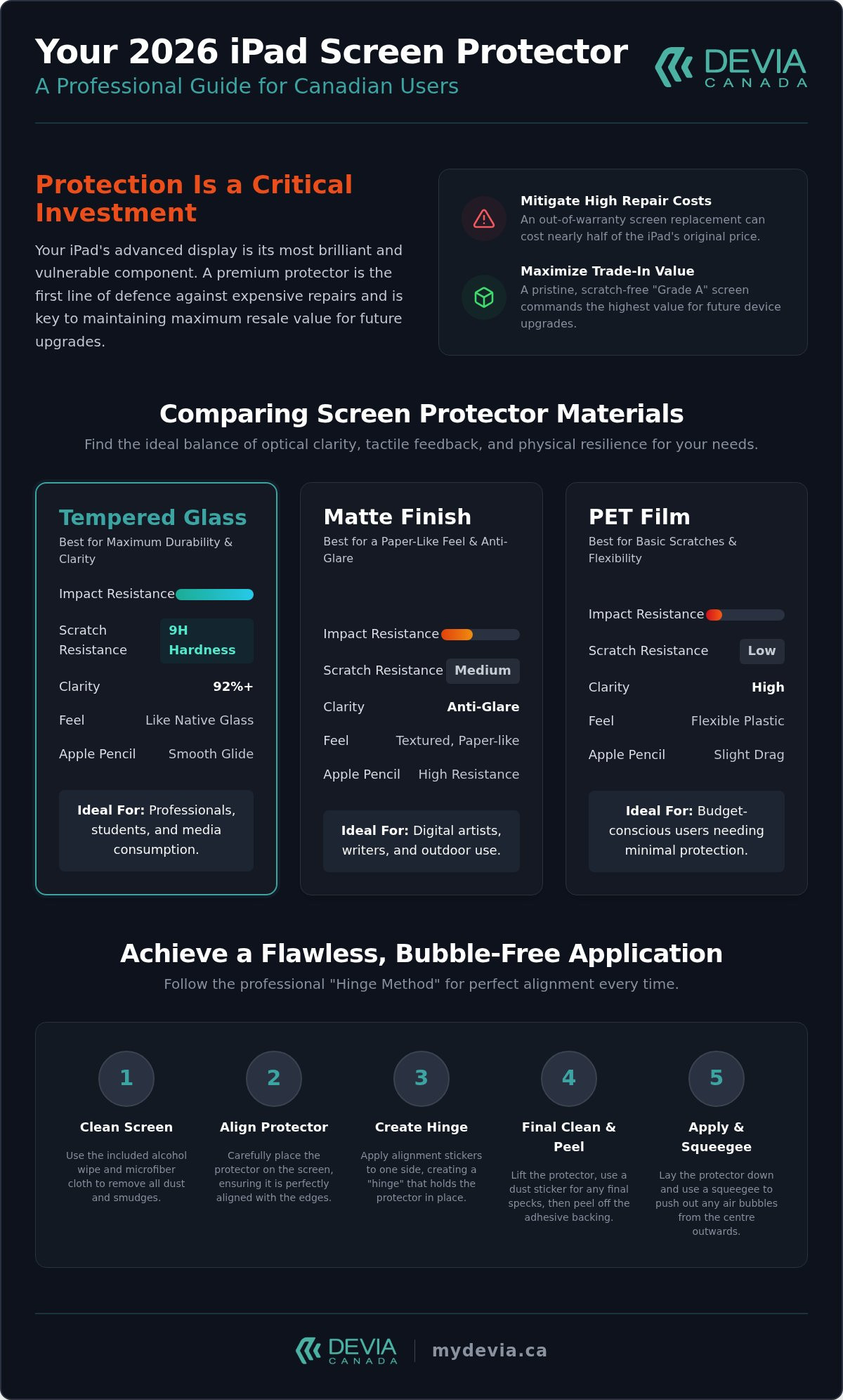
iPad displays in 2026 are engineering marvels, but they aren't invincible. As Apple pushes the boundaries of thinness and brightness, the physical vulnerability of the glass increases. For users seeking an ipad screen protector canada, the motivation is clear: repair costs have reached record highs. Replacing an Ultra Retina XDR panel out-of-warranty can cost nearly half the price of the device itself. A dedicated protector acts as a sacrificial barrier, absorbing the energy from drops and the friction of everyday use.
Maintaining a pristine display is essential for future trade-ins. Canadian marketplaces and trade-in programs demand "Grade A" condition to secure top-tier pricing. Even minor micro-scratches, often invisible until the screen is off, can disqualify a device from the highest valuation. These abrasions occur from everyday contact with dust and debris in your bag or on your desk. In a professional mobile workstation, reliability is paramount. When you integrate your iPad with high-performance hardware like the Leopard Series docking station, you expect a seamless experience. A cracked screen or deep gouge disrupts this workflow and compromises the precision of touch inputs and Apple Pencil strokes.
The Anatomy of Modern iPad Displays
Modern iPads utilize Liquid Retina and Ultra Retina XDR technology to deliver extreme contrast and colour accuracy. These displays are bonded directly to the glass to reduce parallax, which makes them more expensive to fix. Using different Screen protector materials provides a necessary buffer against environmental hazards. The Mohs scale of mineral hardness identifies how easily a surface scratches, with most modern tablet glass beginning to show marks at level 6 or 7. Adding a sacrificial layer with a higher hardness rating ensures that common debris, like sand or metal keys, won't reach the native glass. This extra layer absorbs the friction that would otherwise dull the factory coating over time.
Cost vs. Benefit: Protection as an Investment
The financial logic is simple. Spending a small amount on a premium protector saves hundreds in potential repair fees. This is especially vital for students who rely on a single device for years of note-taking. Long-term durability ensures the device remains functional throughout its lifecycle. Just as you would seek an iphone 17 screen protector to secure your phone, your tablet deserves the same level of systematic care. A high-quality ipad screen protector canada preserves the integrity of the hardware, allowing you to focus on productivity rather than repair logistics. This proactive approach keeps your technology in peak condition for years to come.
Comparing iPad Screen Protector Materials: Glass, PET, and Matte
Selecting an ipad screen protector canada involves balancing optical clarity with physical resilience. The market is primarily divided into three material categories: tempered glass, PET plastic film, and matte finishes. Each serves a distinct user profile, from the creative professional to the high-volume administrative user. Understanding the technical specifications, such as 9H hardness and light transmittance, is vital for ensuring your device remains both functional and protected.
Technical Specifications at a Glance:
- 9H Hardness: Resistance to scratching from materials like steel and quartz; it's the highest rating on the pencil hardness scale.
- Oleophobic Coating: A specialized surface treatment that repels oils and minimizes fingerprint smudges.
- Light Transmittance: The percentage of light that passes through the protector; premium glass often reaches 92% or higher.
- Blue Light Filtering: Technology integrated into some layers to reduce eye strain during long working hours.
Tempered Glass: Maximum Durability
Tempered glass is the industry standard for impact protection. It utilizes a multi-layered construction that includes a silicon adhesive, a PET film layer, and a chemically strengthened top glass layer. This design is rooted in the science of high-strength glass, which focuses on creating compressive stress on the surface to prevent fractures. For Canadian professionals, a 0.33mm thickness is the ideal balance. It provides enough mass to absorb shocks without adding significant weight or affecting the iPad's sleek profile. This material preserves the original colour accuracy of the Liquid Retina display, making it ideal for media consumption and general productivity.
Matte Finish: Anti-Glare for Productivity
Matte protectors, often called "paper-feel," are designed to solve specific environmental challenges. In brightly lit Canadian offices or classrooms, screen reflections can cause significant eye strain. These protectors use a micro-etched surface to scatter light, effectively reducing glare. This texture also provides "tooth," or tactile resistance, which mimics the sensation of writing on physical paper. While this improves Apple Pencil control for artists and students, there's a minor trade-off. The diffusion of light can slightly reduce screen sharpness compared to clear glass. If your priority is precision sketching or long-form note-taking, this texture is indispensable. You can find high-quality options within our selection of ipad cases and protectors to suit your specific workflow.
PET (Polyethylene Terephthalate) film offers a middle ground. It's ultra-slim and provides basic scratch resistance without the bulk of glass. While it doesn't offer the same impact protection, it's an affordable way to prevent micro-abrasions from daily transport. For the best results, ensure your chosen ipad screen protector canada features a high light transmittance rating to maintain the vibrancy of your display.
Choosing the Right Protector for Your iPad Model
Selecting the correct ipad screen protector canada requires more than just matching the screen size. As Apple's 2026 lineup diversifies, the physical architecture of each model dictates specific protection needs. The ultra-thin chassis of the iPad Pro M4 demands a different structural approach than the portability-focused iPad mini. Precision in cutouts for Face ID sensors, ambient light sensors, and front-facing cameras is non-negotiable for maintaining device functionality.
Current iPad Model Considerations:
- iPad Pro (M4): Requires ultra-slim glass to maintain the profile of the thinnest Apple device ever made.
- iPad Air (M2/M3): Now available in 11-inch and 13-inch variants, requiring edge-to-edge coverage that doesn't interfere with the redesigned landscape camera.
- iPad mini: Focuses on high-friction resistance for users who frequently store the device in pockets or small bags.
- iPad (11th Gen): The new 2026 standard for education and entry-level professional use, requiring durable, cost-effective shielding.
iPad Pro and Air: Large Screen Challenges
The 11-inch and 13-inch displays on the latest Pro and Air models are prone to slight flexing under pressure. A high-quality protector must be flexible enough to adhere perfectly without lifting at the corners. For the iPad Pro M4, the protector must not interfere with the Tandem OLED technology or the complex Face ID array. Maintaining a professional aesthetic across all your devices is essential; many users also coordinate their tech with premium apple watch bands to complete their mobile workstation. Ensuring your sensors remain unobstructed is the difference between a seamless login and constant biometric failures.
The Student Choice: iPad 10th and 11th Gen
Students often subject their devices to harsh environments, including heavy backpacks and shared desk spaces. For the 2025 and 2026 iPad 11th Gen, durability is the primary metric. These users need a strategy that prioritizes scratch resistance against stray pens and debris. Compatibility with both the Apple Pencil Pro and older generations is vital. The surface must be responsive enough to register various pressure levels and tilt angles. When sourcing an ipad screen protector canada for educational use, look for reinforced edges. These prevent the "chipping" effect that occurs when a tablet is repeatedly inserted into and removed from a crowded bag. Affordable tempered glass remains the best investment for these high-traffic devices.
How to Install Your iPad Screen Protector Perfectly
A professional-grade ipad screen protector canada requires a systematic installation to ensure long-term performance. Even the highest quality materials can fail if dust or misalignment occurs during the application process. Achieving a factory-finish look depends on your environment and your patience. By following a disciplined method, you can eliminate the frustration of trapped bubbles and crooked edges.
Preparation is the most critical stage. You need a stable, well-lit workspace with minimal air movement. Many professionals prefer a bathroom after a hot shower; the steam helps settle airborne dust particles that would otherwise ruin the adhesive bond. Ensure your hands are clean and free of natural oils before handling the device or the protector.
The "Hinge Method" is the gold standard for perfect alignment. Before removing the protective film, place the glass on your iPad and align it perfectly with the camera and sensors. Use three pieces of adhesive tape on one side to secure the protector to the iPad body, creating a hinge. You can then flip the protector open like a book, clean the screen, and flip it back down for a perfectly aligned fit every time.
The Step-by-Step Application Process
Once your hinge is set, follow these steps for a clean bond:
- Surface Decontamination: Use a 70% isopropyl alcohol wipe followed by a high-density microfibre cloth to remove every trace of oil.
- Dust Extraction: Use the included dust-removal stickers to dab the entire surface. Focus on the edges where debris often hides.
- Adhesive Activation: Peel the backing and lower the protector onto the screen.
- The Centre-Press: Applying firm pressure to the exact centre of the glass allows the adhesive to spread evenly toward the edges, effectively pushing air out in a uniform wave.
Common Installation Mistakes to Avoid
Avoid installing your protector in a breezy room with fans or open windows. Moving air carries microscopic debris that will cause permanent bubbles. You should also avoid harsh household chemicals like window cleaners; these contain ammonia, which can strip the factory oleophobic coating from your iPad display. If you realize a piece of dust is trapped, don't panic. Gently lift the nearest corner with a fingernail, use a dust sticker to grab the particle, and let the glass settle back into place. For the best results, browse our premium ipad screen protector collection to find kits that include specialized alignment tools.
Allow the adhesive to cure for at least 24 hours before applying heavy pressure with an Apple Pencil. This waiting period ensures the silicone layer has fully bonded to the display, preventing the edges from lifting over time.
Why Devia Canada is Canada’s Choice for iPad Accessories
Devia Canada operates as a specialized Canadian retailer focused on high-performance tech hardware and protective solutions. For users sourcing an ipad screen protector canada, we offer more than just a sacrificial layer of glass. We provide a curated selection of accessories designed to work in a systematic ecosystem. Our inventory reflects a disciplined approach to device longevity and user efficiency. We prioritize products that meet the technical demands of 2026 hardware while maintaining the professional aesthetics required in modern corporate and educational environments.
Our commitment to quality extends beyond the material specs of our protectors. We understand that a tablet is a significant investment. Protecting that investment requires a reliable partner within the Canadian market. We offer:
- Verified Compatibility: Every protector is tested against the latest 2026 iPad Pro, Air, and mini sensors.
- National Logistics: Reliable shipping across all Canadian provinces ensures your gear arrives when needed.
- Professional Support: Expert-level product knowledge to help you choose the right material for your specific workflow.
- Ecosystem Integration: Accessories that complement each other, from cases to high-speed docking stations.
The Leopard Series: Beyond Screen Protection
A protected iPad is the foundation of a modern mobile workstation. Our DEVIA USB C Laptop Docking Station Leopard Series (11 in 1) Multi-Port Type-C Fast Charging Smart Hub & Stand – Metal Grey exemplifies this productivity focus. This 11-in-1 hub transforms your tablet into a desktop-class environment with multiple ports for external displays, storage, and peripherals. It's a logical extension of our protection philosophy. While the screen protector secures the glass, the Leopard Series secures your workflow by providing a stable, high-utility stand and connectivity hub. To manage your entire setup, consider exploring our multi-device charging station apple guide for efficient power management across your devices.
Professional Gear for the Canadian Market
We understand the specific needs of Canadian professionals and students who navigate varied environments. Our gear is designed for high-utility and functional resilience. Every ipad screen protector canada in our catalogue undergoes rigorous testing for compatibility with the latest Apple Pencil standards and Face ID arrays. This commitment to technical accuracy differentiates Devia Canada from generic global marketplaces. We support the Canadian e-commerce landscape by providing consistent quality control and localized expertise. Whether you're upgrading to the latest M4 iPad Pro or maintaining a fleet of student devices, our selection provides the necessary hardware for success. Secure your investment today with our comprehensive range of ipad cases and premium screen protection to ensure your technology remains in peak condition.
Secure Your Professional iPad Workflow
Protecting an iPad in 2026 is about more than just avoiding cracks; it's about maintaining a high-performance tool for your daily workflow. You've seen how specific materials like tempered glass or matte finishes cater to different professional needs, and how a precise installation ensures your Apple Pencil remains a seamless extension of your creativity. This disciplined approach to device maintenance ensures that your technology serves you without interruption.
Devia Canada stands as a specialized partner in this journey, offering a selection that balances rugged durability with sleek design. By choosing a high-quality ipad screen protector canada, you align your device with high-performance hardware like our Leopard Series docking stations. This systematic approach to technology ensures your 2026 iPad remains a central, reliable component of your desktop or mobile office. We prioritize functional utility so you can focus on your output.
Shop Premium iPad Screen Protectors at Devia Canada and finalize your device's security today. Investing in the right protection now guarantees a flawless user experience for years to come.
Frequently Asked Questions
Does an iPad screen protector affect Apple Pencil sensitivity?
High-quality screen protectors do not interfere with Apple Pencil sensitivity or pressure response. Modern accessories are engineered to maintain full compatibility with the latest 2026 Apple Pencil Pro and older generations. You'll experience the same precision for sketching and note-taking as you would on a bare display. Choosing a premium ipad screen protector canada ensures that the thinness of the material allows for perfect capacitive signal transmission.
What is the difference between 9H tempered glass and plastic film?
Tempered glass provides superior impact protection and scratch resistance compared to plastic PET film. The 9H rating refers to the material's ability to resist scratches from a 9H lead pencil, which is the highest standard for consumer electronics. While plastic films are thinner and more affordable, they only protect against micro-abrasions. Glass acts as a sacrificial layer that absorbs energy during a drop, often preventing the native iPad screen from shattering.
Will an iPad Pro screen protector fit an iPad Air of the same size?
Typically, an iPad Pro protector will not fit an iPad Air perfectly due to differences in sensor and camera placement. While the screen diagonals might match, the cutouts for Face ID on the Pro models differ from the camera and light sensor arrays on the Air. Using the wrong model can block your sensors or cause biometric login failures. Always verify the specific generation and model name before purchase to ensure a precise fit.
How do I remove an old or cracked screen protector safely?
You can remove a protector safely by gently lifting one corner with a plastic card or your fingernail. Once a corner is raised, pull the glass away from the display slowly and steadily to prevent the material from splintering further. If the protector is badly shattered, you may want to use a piece of adhesive tape over the cracks to hold the shards together during removal. Clean the screen with isopropyl alcohol afterward to remove any remaining adhesive residue.
Are "paper-feel" screen protectors better for note-taking?
Matte or "paper-feel" protectors are specifically designed to improve the tactile experience for students and artists. These surfaces provide a slight amount of friction, or "tooth," which mimics the sensation of writing on physical paper. This reduces the slippery feel of the Apple Pencil on glass, leading to better handwriting control. While they reduce glare in bright environments, they can slightly diminish the absolute colour vibrance of the Liquid Retina display.
Can I use a screen protector with a rugged iPad case?
Most screen protectors are compatible with rugged cases, provided they are "case-friendly" designs. These protectors are cut slightly smaller than the actual screen size to prevent the edges of a heavy-duty case from pushing against the glass and causing it to lift. When you source an ipad screen protector canada from a professional retailer, check for edge-to-edge specifications. This ensures your protection ecosystem works together without creating air bubbles at the corners.
How often should I replace my iPad screen protector?
You should replace your protector whenever it develops a crack, deep scratch, or starts lifting at the edges. Even a hairline fracture in tempered glass compromises its structural integrity and reduces its ability to absorb future impacts. For professional users who transport their devices daily, a replacement every 12 months is standard to maintain optical clarity. If the oleophobic coating has worn off and fingerprints become difficult to wipe away, it's time for a new one.
Do screen protectors prevent the iPad screen from cracking if dropped?
Screen protectors significantly reduce the risk of a cracked screen by absorbing the initial shock of an impact. They serve as a sacrificial barrier that takes the damage so your iPad's native glass doesn't have to. While no protector can guarantee 100% safety against high-velocity drops on hard surfaces, they are the most effective way to prevent costly display repairs. Combining a 9H glass protector with a high-quality case provides the best overall security for your device.