

Fast Charging USB C Hub Canada: The 2026 Guide to Laptop Productivity
2026 Jul 27th
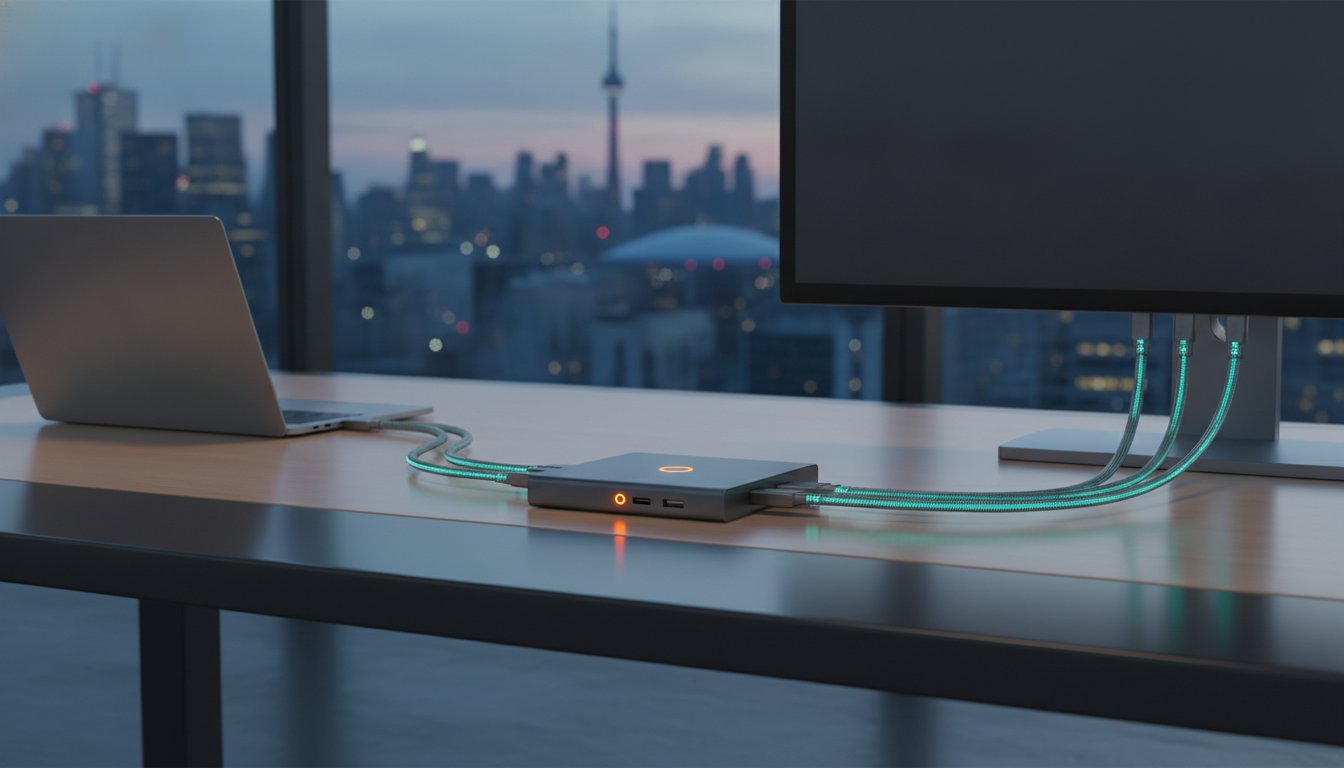
Over 70% of modern professionals now rely on a USB Type-C hub for their daily productivity. However, many Canadian users still face the daily annoyance of slow charging and desk clutter. Finding a reliable fast charging usb c hub canada is no longer just about adding extra ports. It's about maintaining a streamlined workflow without the frustration of device overheating or monitor lag. If you've ever dealt with a laptop that drains power faster than it charges while connected to a generic adapter, you understand the need for better hardware.
It's frustrating when a single adapter can't handle your 4K display and high-draw power needs at the same time. You deserve a setup that's both high-performing and visually organized. This guide helps you realize that goal by breaking down the 2026 hardware standards. You'll learn how to choose the ideal high-speed hub to organize your workspace and achieve maximum charging efficiency. We'll preview the latest 240W Power Delivery specs, 80Gbps data transfer rates, and multi-functional designs like the Devia Canada Leopard Series 11-in-1 hub.
Key Takeaways
- Understand how Power Delivery 3.1 and pass-through charging prevent battery drain during data-intensive tasks.
- Identify why 11-in-1 port density is the optimal choice for connecting 4K monitors and legacy hardware through a single connection.
- Determine the critical compatibility requirements for a fast charging usb c hub canada to support high-draw laptops and Thunderbolt 4 standards.
- Realize a more efficient workspace by utilizing integrated stand designs that improve ergonomics and thermal management.
- Evaluate the functional benefits of the Devia Leopard Series as a comprehensive docking solution for the modern Canadian professional.
What is a Fast Charging USB C Hub and Why Do You Need One?
A fast-charging USB-C hub is a specialized hardware device that transforms a single Type-C port into a multi-functional connectivity centre. It doesn't just expand your port count; it acts as a power conduit. For professionals searching for a fast charging usb c hub canada, the goal is often to find a device that handles high-speed data and power simultaneously. This capability is the core difference between a basic hub and a smart hub.
Standard hubs often fail under pressure. They might support a mouse or a thumb drive, but they can't sustain the power requirements of a modern laptop. A fast-charging smart hub uses Power Delivery (PD) to negotiate the correct voltage between the wall charger and your computer. This ensures your battery stays charged even during heavy workloads like 4K video rendering or large file transfers. Without this technology, your laptop might actually lose power while plugged in, leading to unexpected shutdowns during critical tasks.
The Evolution of Port Connectivity
The shift toward ultra-thin laptops has created a significant "port scarcity" problem. Most premium devices now rely entirely on USB-C technology for everything from charging to display output. Early solutions involved a messy collection of separate adapters. In 2026, the trend has shifted toward integrated 11-in-1 docking stations. These units are safer and more reliable than using multiple cheap dongles. A single, high-quality hub provides a stable electrical environment, reducing the risk of overheating or port wear on your expensive hardware.
Key Benefits for the Canadian Workspace
Efficiency is the primary driver for Canadian professionals switching to high-density hubs. Whether you're working from a home office or a corporate centre, a clean desk setup is essential for focus. A fast charging usb c hub canada allows you to organize your workspace by consolidating cables into one hub.
- Seamless Transitions: Move between work environments by connecting just one cable instead of five.
- Desk Organization: Realize a clutter-free workspace by hiding peripheral cables behind the hub.
- Technical Standards: Ensure your setup meets modern standards for 4K video and high-speed networking.
Using a hub with integrated Power Delivery means you don't need to carry a bulky laptop brick to every meeting. With pass-through charging, the hub takes power from a single wall adapter and distributes it to your laptop and connected peripherals. This level of utility is why the 11-in-1 format has become the professional sweet spot in 2026. It provides enough port density for dual monitors, external storage, and wired internet without requiring a massive footprint on your desk.
Understanding Power Delivery (PD) and Fast Charging Tech
Power Delivery (PD) is the backbone of modern laptop accessories. It allows a single cable to carry high-wattage power alongside high-speed data. When you're looking for a fast charging usb c hub canada, you're looking for a device that supports PD 3.0 or higher. This protocol enables the hub to negotiate power levels with your laptop, ensuring it receives the exact voltage required for safe operation. Global movements like the common charger initiative have accelerated this technology, making USB-C the universal standard for professional hardware.
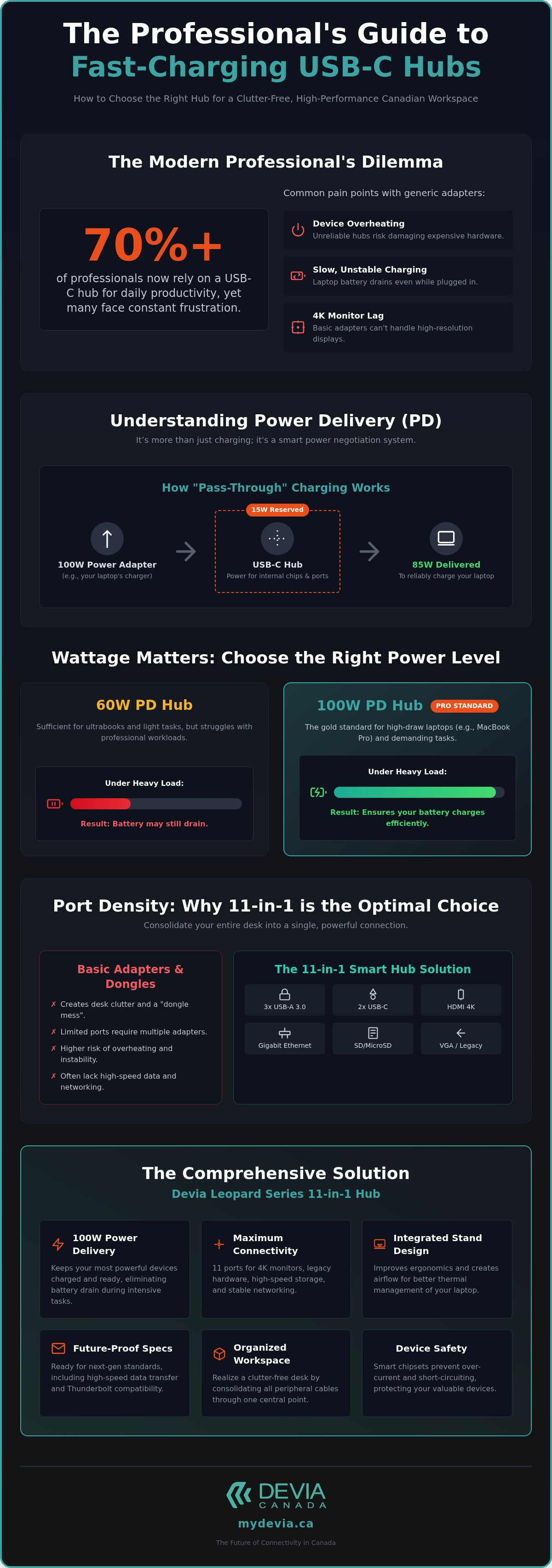
The most critical concept to understand is "Pass-Through" charging. In this setup, your laptop's wall adapter plugs into the hub, which then connects to your computer. It's a chain of power. However, the hub itself is an active electronic device that requires energy to run its internal chips, HDMI converters, and USB-A ports. Most hubs reserve between 10W and 15W for these functions. If you plug in a 100W charger, your laptop might only receive 85W. This distribution is why choosing the right wattage is essential for high-draw machines like the MacBook Pro.
Wattage Matters: 60W vs 100W PD
A 100W hub is the gold standard for 2026. While a 60W hub might suffice for a standard ultrabook, it often falls short for professional workstations. A MacBook Pro under heavy load can draw 96W or more. If your hub only passes through 45W, your battery will continue to drain even while plugged in. You must calculate the total draw of your peripherals; a bus-powered external hard drive or a backlit keyboard can pull several watts each. Using a high-capacity multi-port smart hub ensures your laptop battery actually charges while you work.
Smart Charging and Device Safety
Modern smart hubs include dedicated chipsets to manage electrical flow. These chips communicate with your laptop to prevent overcharging and short circuits. Heat management is another vital factor. Fast charging generates thermal energy, which can throttle data speeds or damage internal components if not managed. Metal-cased hubs are superior for heat dissipation because the alloy acts as a passive heat sink. This helps you realize better hardware longevity. You don't want a plastic hub that traps heat; a metal grey finish is often a sign of a premium, thermally efficient design that can handle 24/7 operation in a busy Canadian office.
Comparing 11-in-1 Hubs vs. Basic USB-C Adapters
Basic USB-C adapters often solve one problem while creating another. You might gain an HDMI port but lose your only charging slot. A professional 11-in-1 station eliminates this compromise. It serves as a centralized docking point for every peripheral in your Canadian home office. Choosing a fast charging usb c hub canada with high port density ensures you are prepared for both modern 4K displays and legacy hardware. While 5-in-1 or 8-in-1 models are common, they often lack the specific utility required for a full desktop replacement setup.
The technical sophistication of these hubs relies on the USB Power Delivery standard to manage complex data and power streams simultaneously. High-density hubs divide bandwidth intelligently. They prioritize high-speed USB 3.0 ports for external SSDs while reserving stable USB 2.0 connections for keyboards and mice. This division prevents signal interference and ensures that your most demanding tasks, like data backups, don't lag due to peripheral congestion.
Connectivity Breakdown: What You Get
An 11-in-1 hub provides a comprehensive suite of connections that basic dongles cannot match. This includes:
- Dual Video Output: 4K HDMI for modern monitors and VGA for legacy projectors or secondary screens.
- High-Speed Networking: An RJ45 Ethernet port for stable, gigabit internet during video conferences.
- Media Access: Dedicated SD and Micro SD card slots for quick photo and video transfers.
- Peripheral Support: Multiple USB-A ports to connect legacy hardware and thumb drives.
Design and Form Factor
Form follows function in professional hub design. A "Metal Grey" aluminium finish is not just an aesthetic choice; it is a thermal necessity. Metal casings act as passive heat sinks, drawing warmth away from the internal chips to maintain peak performance. Many 11-in-1 models now feature an integrated stand design. This ergonomic addition lifts your laptop to a more comfortable viewing angle. It also creates a channel for better airflow, which helps you realize lower operating temperatures during intensive processing tasks.
Using a multi-port smart hub transforms your laptop into a stable tech ecosystem. Instead of fumbling with three different adapters, you connect one cable to access your entire desk. This level of organization is essential for hybrid workers who need to transition between locations quickly. A well-designed fast charging usb c hub canada provides the reliability of a desktop workstation with the portability of a mobile accessory.
How to Choose the Best USB C Hub in Canada
Selecting a fast charging usb c hub canada requires more than just counting ports. You must first audit your specific hardware requirements. Start by listing every peripheral you connect daily. If you use dual monitors, verify that the hub supports the specific resolution and refresh rate of your screens. Many generic hubs claim 4K support but only at 30Hz; look for 60Hz capability to ensure smooth video for professional tasks. A hub with an integrated stand also provides an ergonomic advantage by lifting your screen to a better viewing height.
Protocol compatibility is the next hurdle. While the physical connector looks the same, the underlying technology varies significantly. Thunderbolt 4 ports offer the highest bandwidth, but they require compatible hubs to reach maximum speed. Standard USB-C ports are common but often have lower data ceilings. Always verify your laptop's technical specifications to see if your port supports DisplayPort Alt Mode and Power Delivery. Without these features, even a premium hub cannot output video or charge your battery.
Canadian professionals benefit from sourcing a fast charging usb c hub canada from local retailers. This ensures reliable national shipping and responsive customer service. Local retailers understand the hardware standards used in the Canadian market and provide better warranty support than anonymous international marketplaces. Prioritizing durable materials is also vital. Aluminium alloy is the professional choice because it dissipates heat better than plastic, preventing the hub from throttling data speeds during long work sessions.
Compatibility Check for 2026 Devices
Connectivity has standardized across platforms in 2026. Modern devices like the iPhone 17 and Samsung Galaxy now utilize high-speed Type-C ports for both charging and media. However, protocol differences remain between MacBook and Windows PC users. MacBooks often require specific hardware to manage dual extended displays properly. To ensure all your accessories work together, review The Complete Guide to Multi-Device Charging Stations for the Apple Ecosystem. This helps you realize a seamless transition between your mobile devices and your main workstation.
Quality Indicators to Look For
Look for reinforced connectors and heavy-duty cabling. The connection between the hub and your laptop is the most common failure point. A braided cable or a reinforced neck increases longevity. Weight and stability are also key factors. If the hub acts as a stand, it needs enough mass to remain stable under the weight of your laptop. High-quality manufacturers in the Canadian market will provide clear warranty terms and technical specifications for every port.
Upgrade your workspace with a premium docking station that combines port density with reliable power delivery.
The Devia Leopard Series: A Professional 11-in-1 Solution
The DEVIA USB C Laptop Docking Station Leopard Series, offered by Devia Canada, represents the pinnacle of workspace organization. It isn't just an adapter; it's a comprehensive docking solution that addresses the specific needs of the Canadian hybrid worker. By integrating 11 distinct ports into a single unit, this hub allows you to realize a desktop-level experience from a portable laptop. If you've been searching for a fast charging usb c hub canada that won't overheat or throttle during heavy use, the Leopard Series provides the stability required for professional-grade productivity.
This station effectively solves the dual challenge of port scarcity and ergonomic discomfort. Most hubs dangle from the side of a laptop, creating cable strain and clutter. The Leopard Series utilizes a dual-purpose design that functions as both a high-speed hub and an ergonomic laptop stand. This configuration lifts your device to improve your viewing angle while simultaneously creating a channel for passive airflow. It's a calculated approach to hardware design that prioritizes both the longevity of your machine and your personal comfort during long work sessions.
Leopard Series Technical Highlights
The technical specifications of the Leopard Series are tailored for power-hungry professionals. The hub features a Metal Grey finish that matches the aesthetic of modern premium hardware. Internally, the smart hub technology manages power distribution across all 11 ports to ensure your laptop receives consistent voltage through its Power Delivery input. The port selection is dense and functional:
- High-Resolution Video: HDMI output for crisp 4K monitor support.
- Rapid Data Transfer: Multiple USB 3.0 ports for high-speed external storage.
- Integrated Media Hub: Dedicated slots for both SD and Micro SD cards.
- Stable Networking: A built-in Ethernet port for reliable, wired internet connections.
Why Devia Canada is the Choice for Canadians
Devia Canada has established itself as a reliable expert in high-performance tech hardware. For users in Canada, choosing this brand means accessing a curated selection of accessories that meet local technical standards. The Leopard Series is part of a broader ecosystem designed to protect and enhance your mobile technology. You can easily pair your professional hub with an iphone 17 case for a complete mobile protection kit. This systematic approach to consumer electronics ensures that every piece of your tech kit works in harmony. By choosing a fast charging usb c hub canada from a trusted national provider, you ensure faster shipping times and access to expert support whenever you need to optimize your professional setup.
Optimize Your Canadian Workspace for 2026
A professional desk setup requires more than just extra ports. It demands a reliable power management system that prevents battery drain during intensive tasks. You've learned that Power Delivery 3.0 and high-density 11-in-1 connectivity are the benchmarks for modern productivity. Choosing a high-quality fast charging usb c hub canada ensures your laptop remains cool and powered while handling multiple 4K displays and high-speed data transfers. A metal grey finish and integrated stand design aren't just for aesthetics; they are functional requirements for heat dissipation and ergonomic health.
Investing in the right hardware helps you realize a more efficient workflow. Don't settle for generic adapters that throttle your speed or clutter your desk. Shop the Devia Leopard Series 11-in-1 Docking Station Now to access premium features like integrated fast charging, 11-in-1 multi-port connectivity, and a durable metal grey finish. It's time to build a workspace that works as hard as you do.
Frequently Asked Questions
Can I charge my laptop through a USB-C hub?
Yes, you can charge your laptop if the hub supports Power Delivery (PD) pass-through. You plug your existing USB-C power adapter into the hub's dedicated PD port. The hub then transfers power to your laptop while simultaneously managing data for your peripherals. This setup is essential for maintaining a full battery during resource-heavy tasks like video editing or large file transfers.
Will a fast charging USB-C hub work with my MacBook Air?
Yes, MacBook Air models with USB-C or Thunderbolt ports are fully compatible with these devices. Using a fast charging usb c hub canada allows you to expand the limited port selection on the Air while keeping it charged. Since the Air has a lower power draw than the Pro, a 100W PD hub provides more than enough energy to charge the battery at maximum speed.
Does using a multi-port hub slow down my internet or data transfer speeds?
A high-quality hub won't noticeably slow down your speeds under normal conditions. These devices use internal controllers to manage bandwidth across different ports. However, if you're transferring large files via USB 3.0 while streaming 4K video and using gigabit Ethernet, the total bandwidth of the single connection to your laptop is shared. Modern hubs are engineered to prioritize critical data streams to maintain stability.
Do I need a special cable for Power Delivery to work?
You need a USB-C cable specifically rated for Power Delivery to achieve fast charging. Not all cables are the same; some only support data transfer or low-wattage charging. To realize the full potential of a 100W hub, ensure your cable is electronically marked (e-marked) for high wattage. Using an inferior cable can limit your charging speed or cause the hub to disconnect under load.
Is it safe to leave my USB-C hub plugged in all the time?
It is safe to leave your hub connected to your workstation. Professional hubs feature smart chipsets that regulate electrical flow and prevent overcharging or short circuits. While the hub stays in a low-power standby mode when your laptop is off, disconnecting it during extended travel or long holidays is a good practice to minimize phantom power draw and maximize hardware longevity.
What is the difference between a USB-C hub and a docking station?
Hubs are generally portable accessories that expand port counts, while docking stations are stationary units with dedicated power supplies. The Devia Leopard Series functions as a hybrid, providing the 11-in-1 port density of a docking station with the slim profile of a hub. This makes it an ideal solution for Canadian hybrid workers who need a full desktop setup that can also fit into a laptop bag.
Can a USB-C hub support two monitors simultaneously?
Yes, many 11-in-1 hubs support dual monitor setups through HDMI and VGA ports. To use this feature, your laptop port must support DisplayPort Alt Mode. On Windows devices, you can usually extend your desktop across both external screens. Some MacBooks may be limited to mirroring the same image on both external displays depending on the specific macOS version and hardware generation you use.
Why does my USB-C hub get warm during use?
Hubs get warm because they perform complex electrical conversions and manage high-speed data streams. This is a normal part of the heat dissipation process. Metal-cased hubs, like those with a metal grey finish, are designed to pull heat away from internal chips and release it through the outer shell. This prevents the device from overheating and ensures your data transfer speeds remain stable during heavy use.